老刘经常介绍RackNerd商家的美国便宜VPS,不过测评文章还是挺少的,今天老刘这里入手在售的年付$10.99/年的1G大带宽RackNerd圣何塞VPS,进行主机测评。这是RackNerd的2024农历春节促销特价套餐,可选圣何塞、洛杉矶DC-02(第一款除外)、西雅图、达拉斯、芝加哥、纽约、亚特兰大、阿什本机房,详情是:
| 1核CPU | 1核CPU | 2核CPU |
| 1G内存 | 1.5G内存 | 2.5G内存 |
| 15GB SSD硬盘 | 25GB SSD硬盘 | 38GB SSD硬盘 |
| 4TB月流量 | 8TB月流量 | 12TB月流量 |
| 1Gbps带宽 | 1Gbps带宽 | 1Gbps带宽 |
| 1个IPv4 | 1个IPv4 | 1个IPv4 |
| 10.99美元/年 | 16.88美元/年 | 23.88美元/年 |
| 点击购买 | 点击购买 | 点击购买 |
列表中展示的是翻倍后的流量,大家可以入手后点此在LET留言订单号索要双倍流量,也可以官网工单申请。
RackNerd美国便宜VPS更多套餐参见文章:RackNerd便宜美国VPS仅$10.18/年,1Gbps大带宽2TB流量,可选圣何塞,洛杉矶等机房。
老刘这里选择了地理位置离中国更近的美西圣何塞机房,使用了支付宝支付,合80.19元,目前商家已经支持的支付方式有虚拟货币(BTC、USDT等)、PayPal、信用卡、支付宝等。
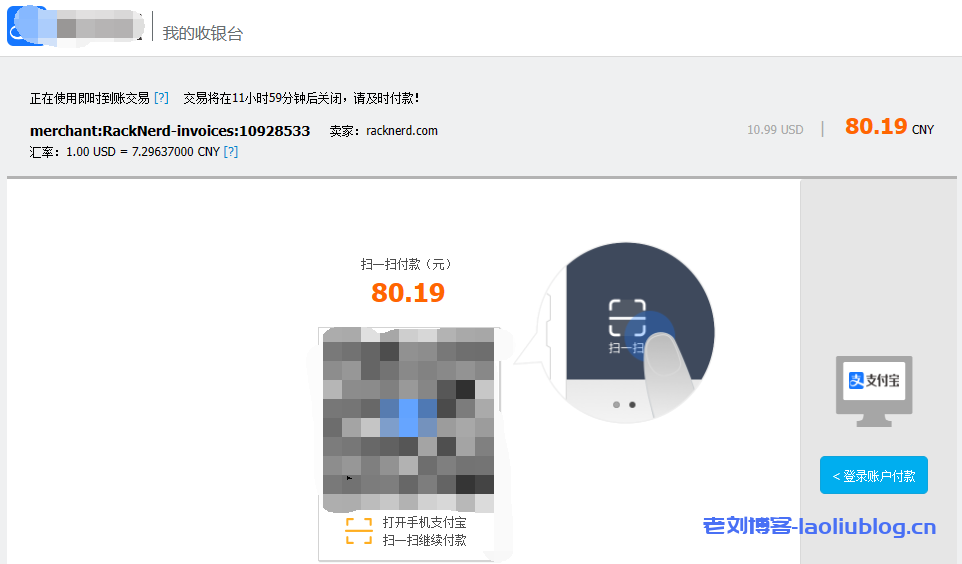
主机测评之$10.99/年的RackNerd圣何塞VPS详情:
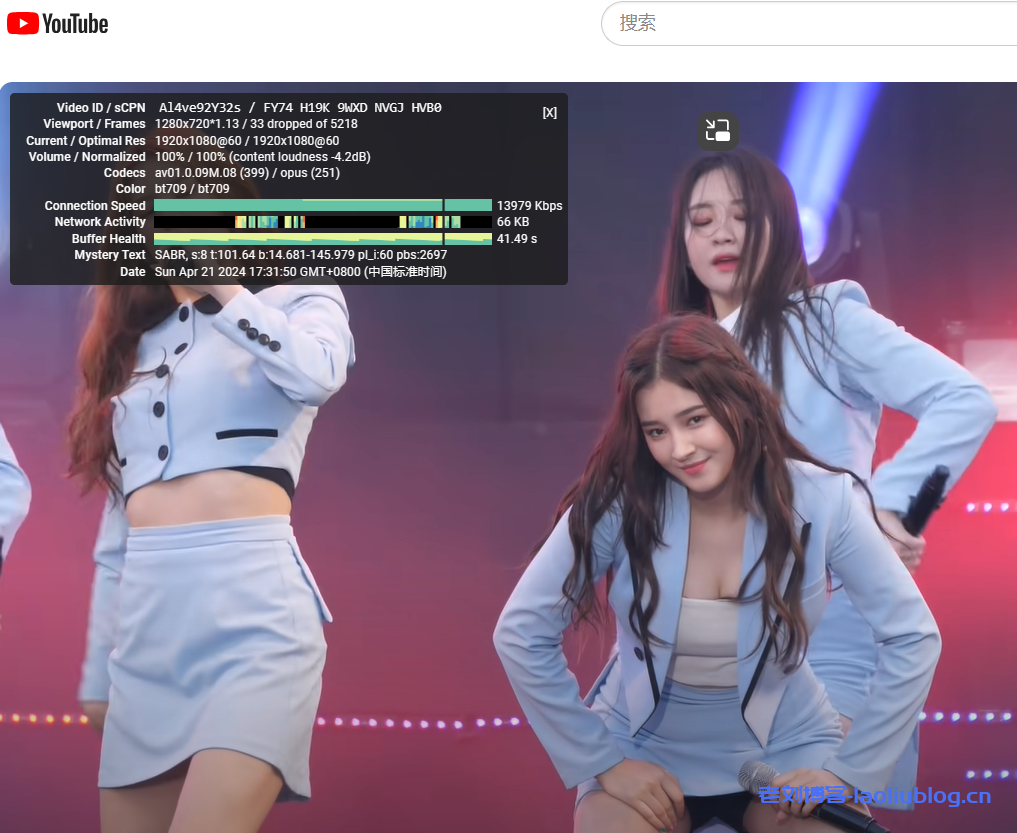
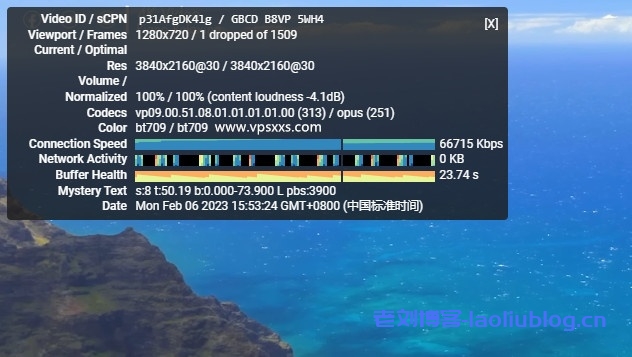
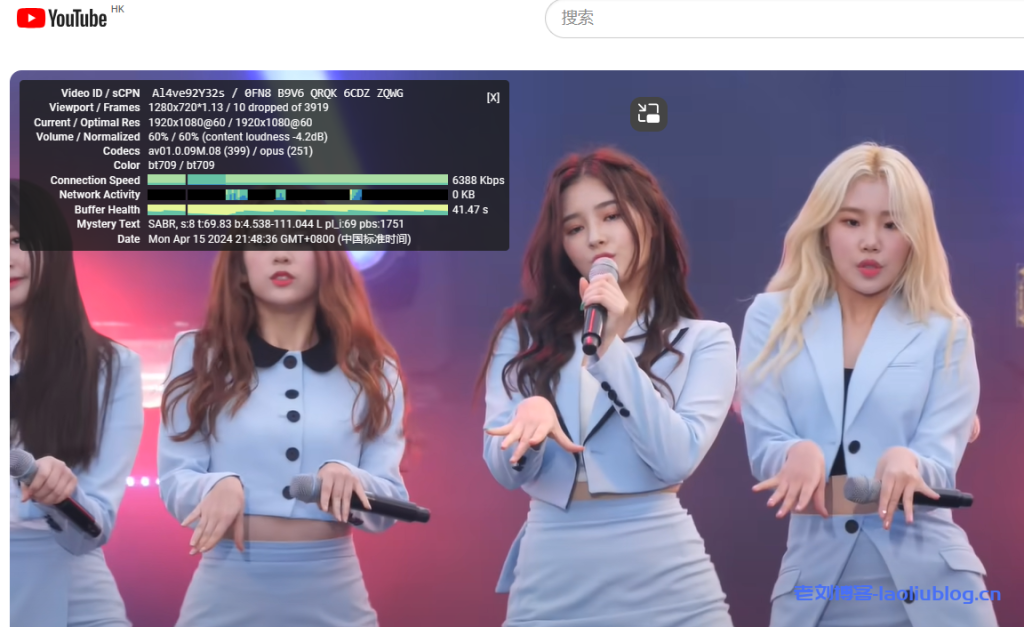
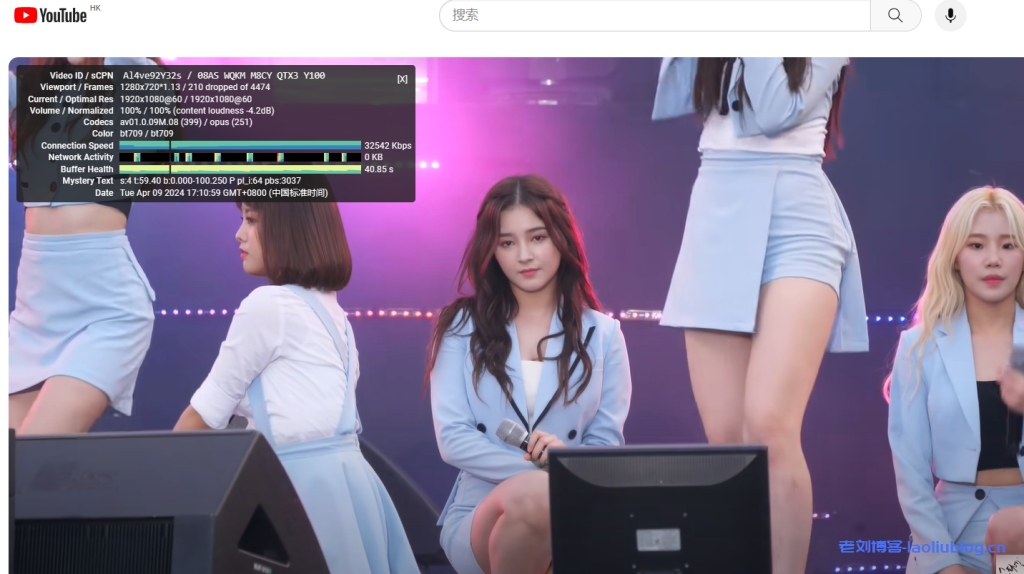
先用这台VPS看看视频,继续看韩国女团油管扭屁股(我本地100M电信宽带,实际估计不到50M吧)
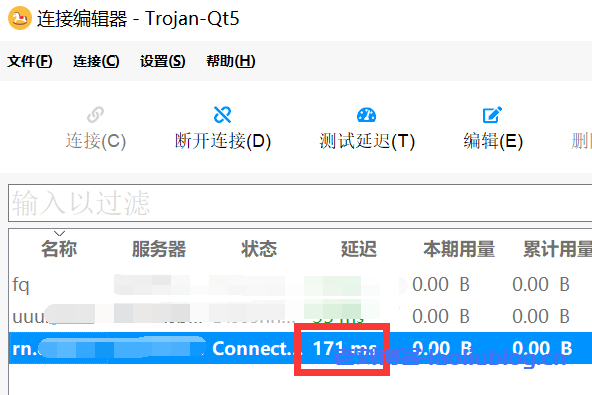
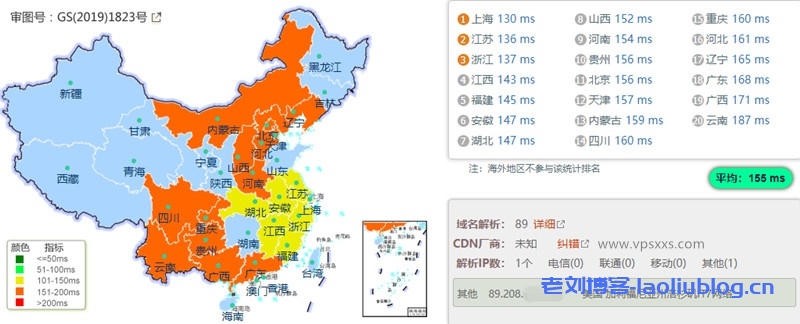
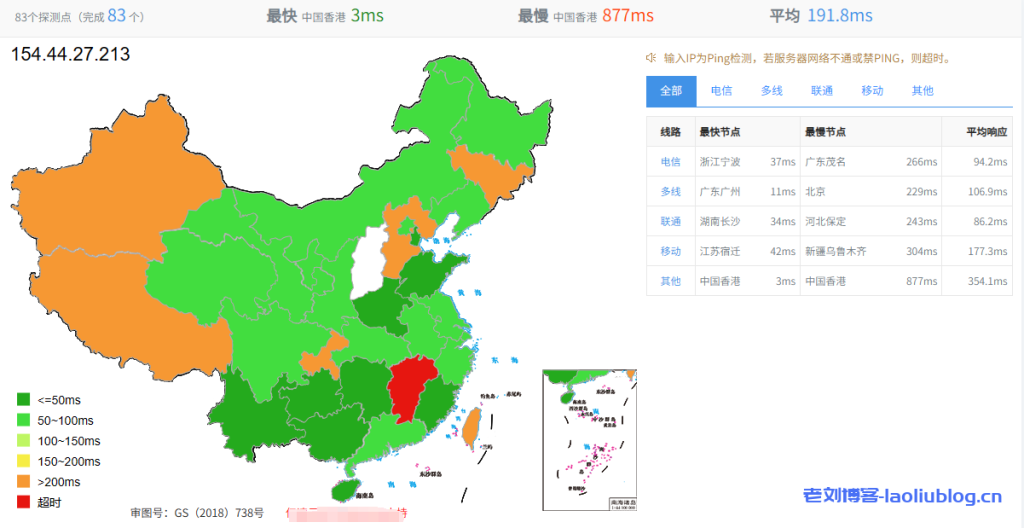
171ms的延迟还可以,毕竟美国节点
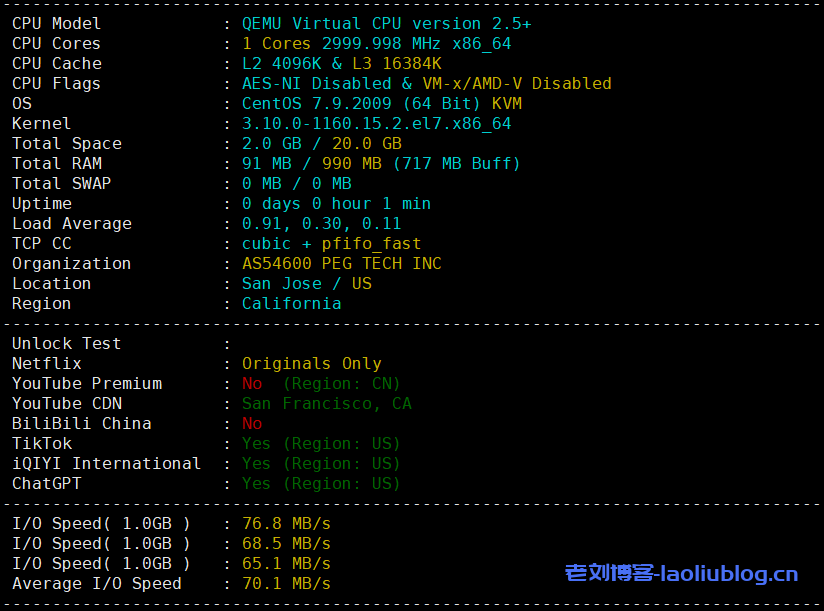
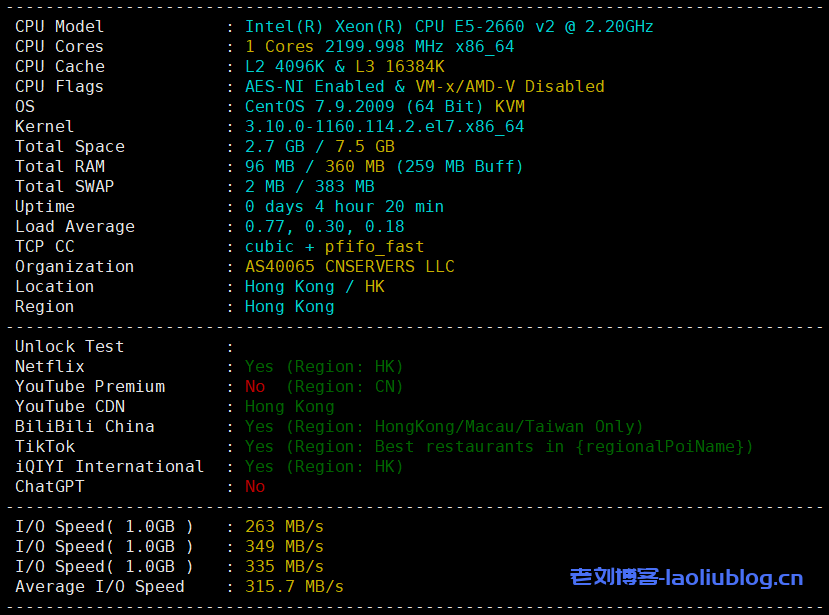
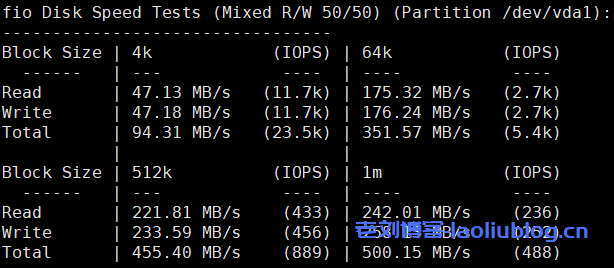
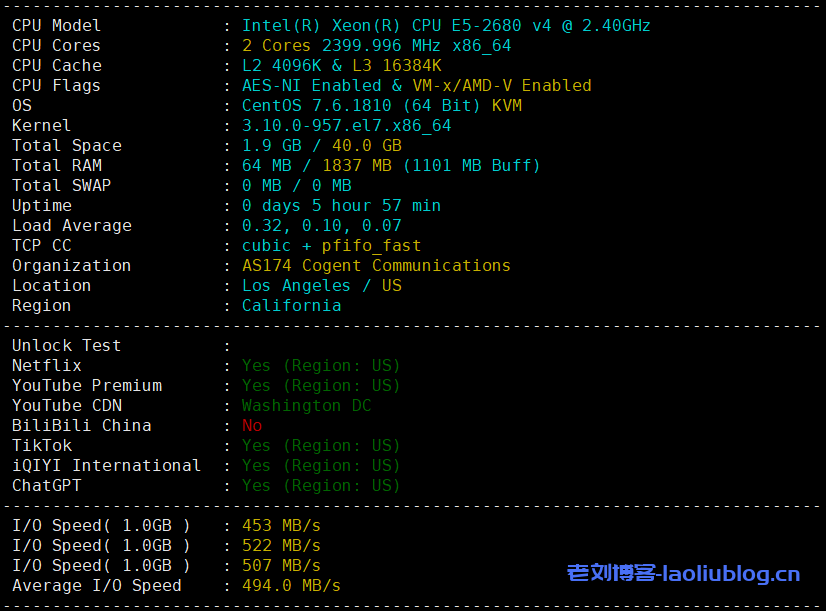
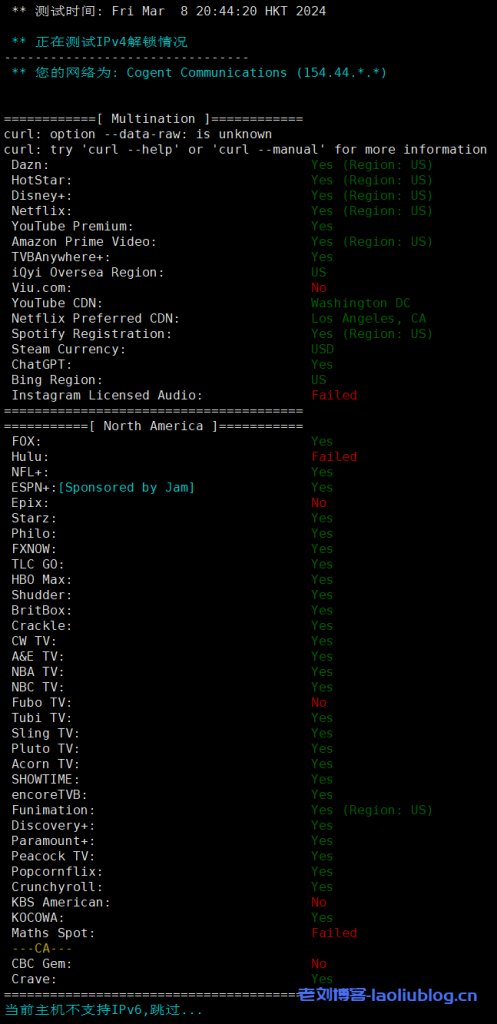
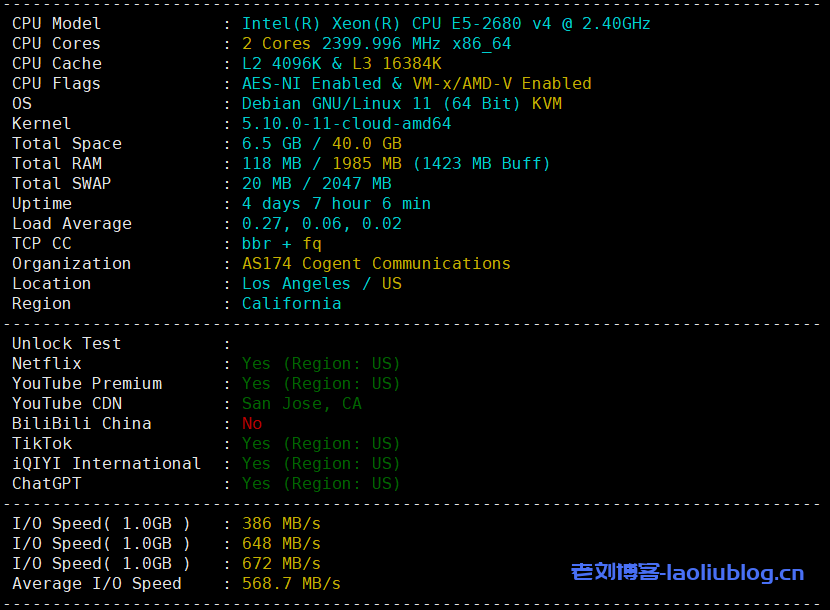
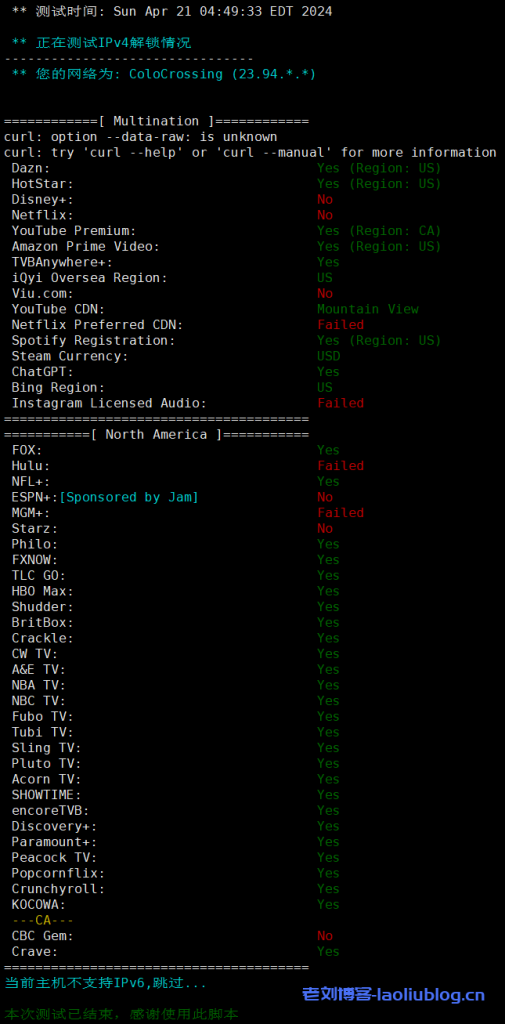
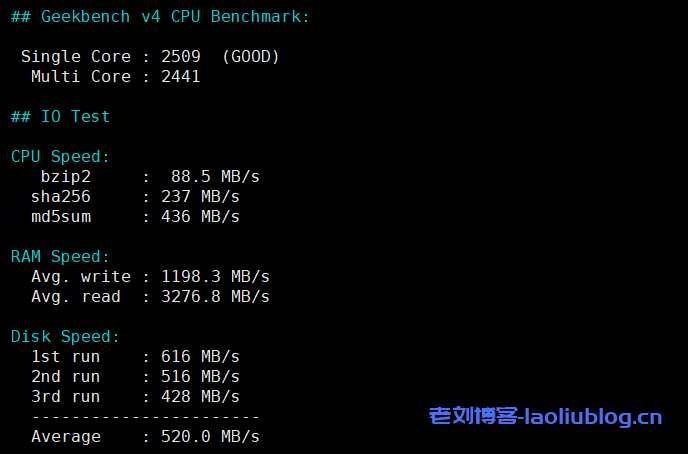
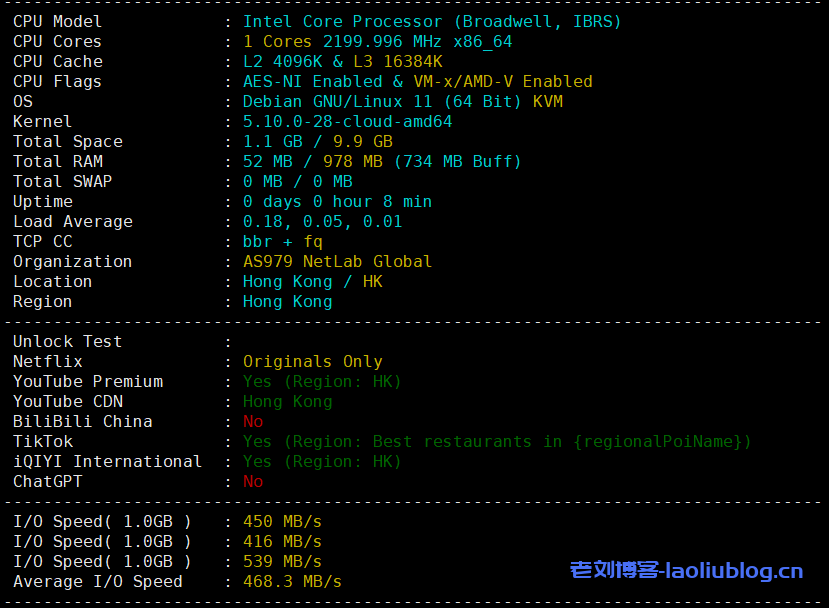
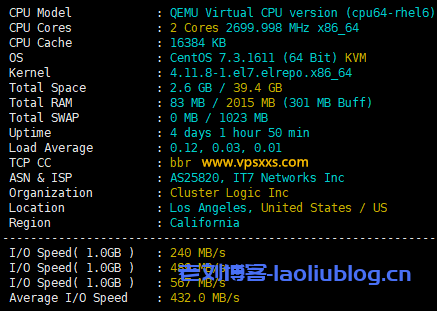
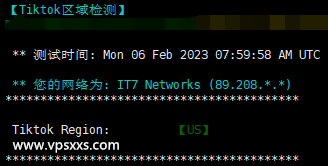
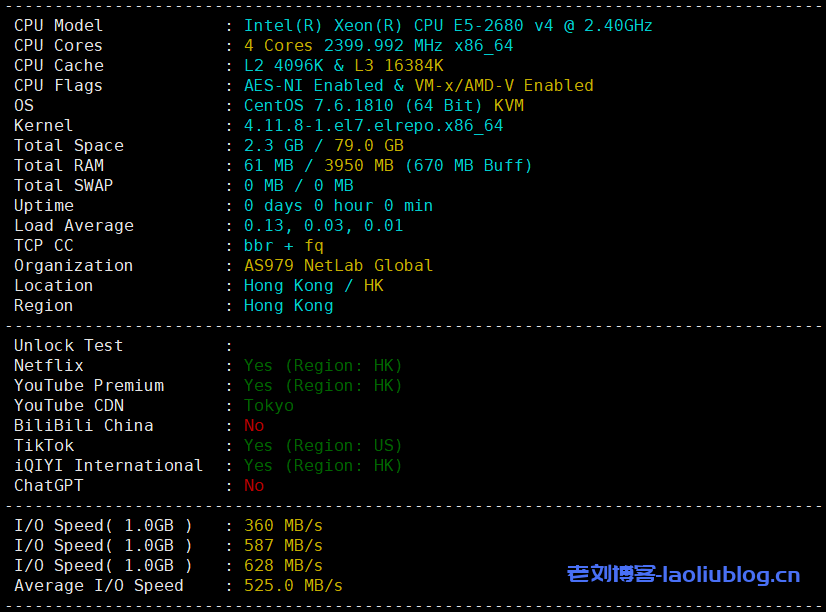
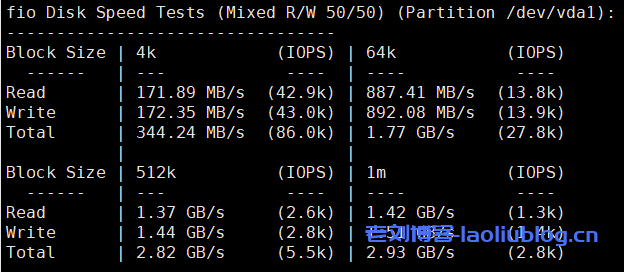
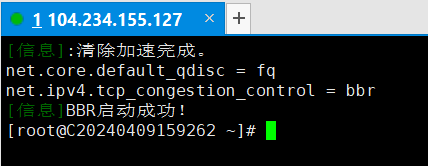
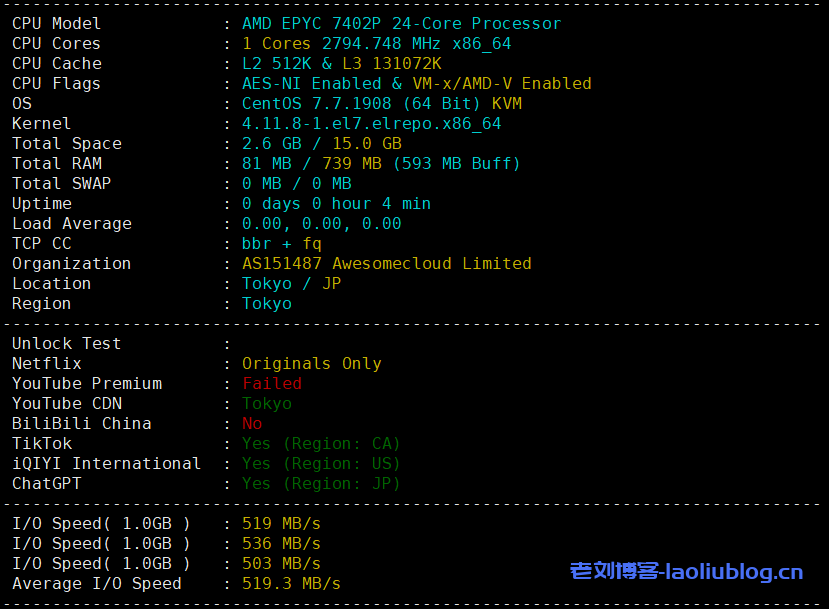
基础配置信息与描述相符,老刘这里自己开启了BBR;流媒体解锁tiktok、chatgpt,不解锁奈菲;磁盘读写速度578MB/s的样子

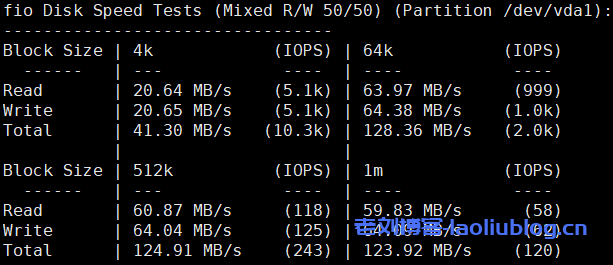
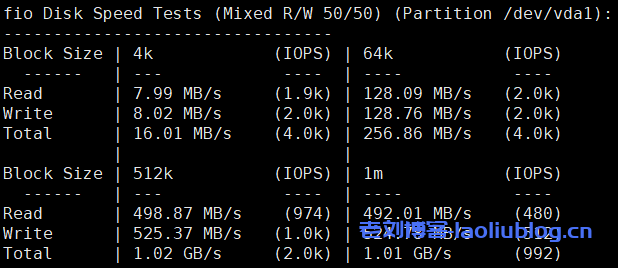
fio磁盘读写速度数据

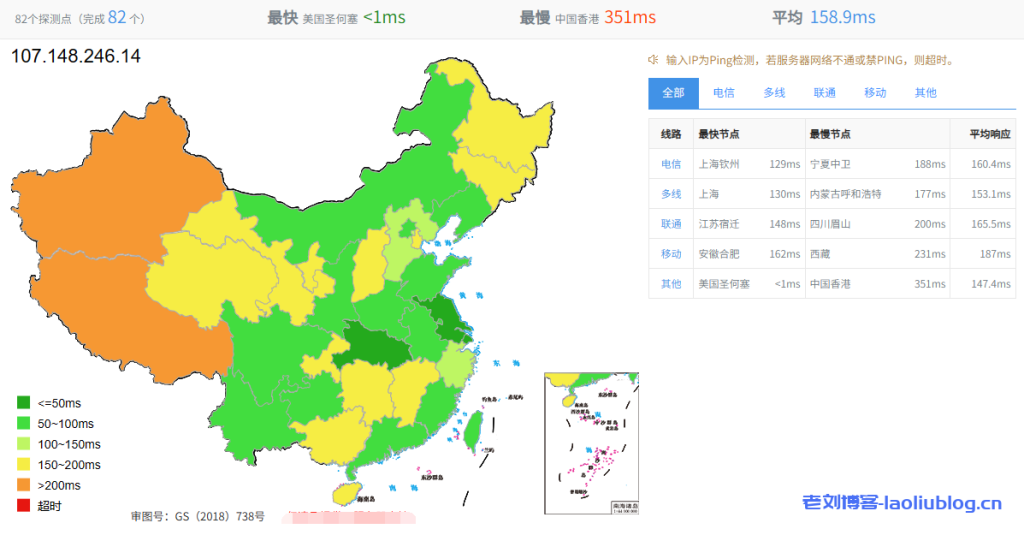
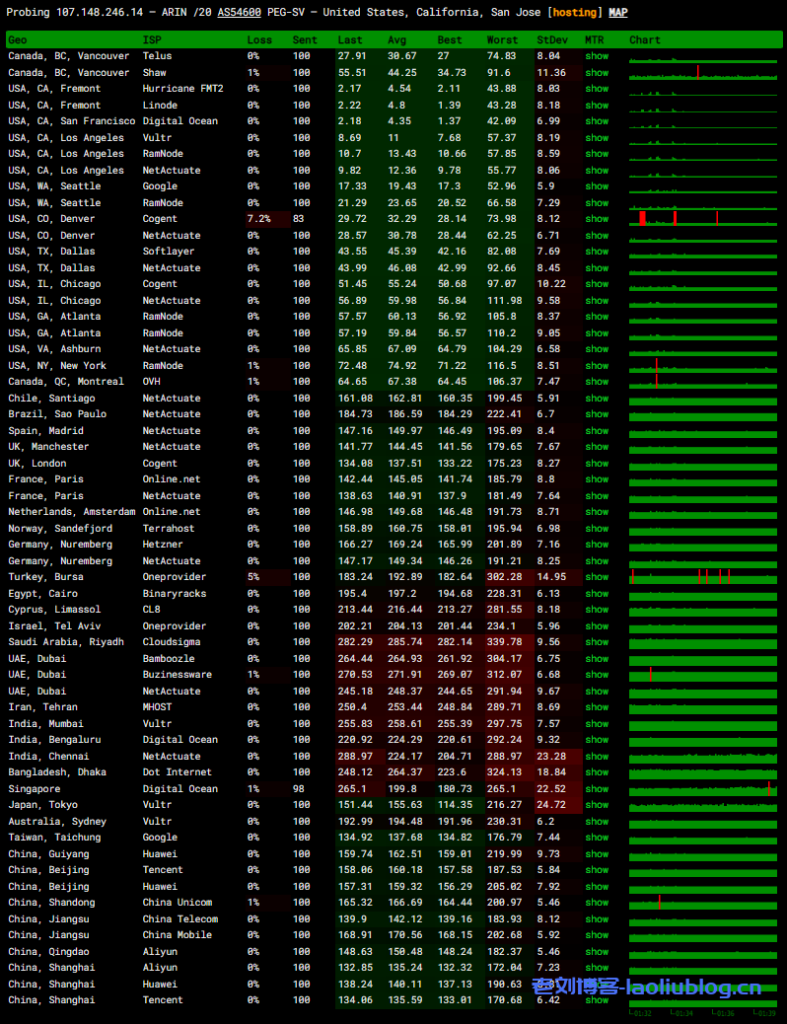
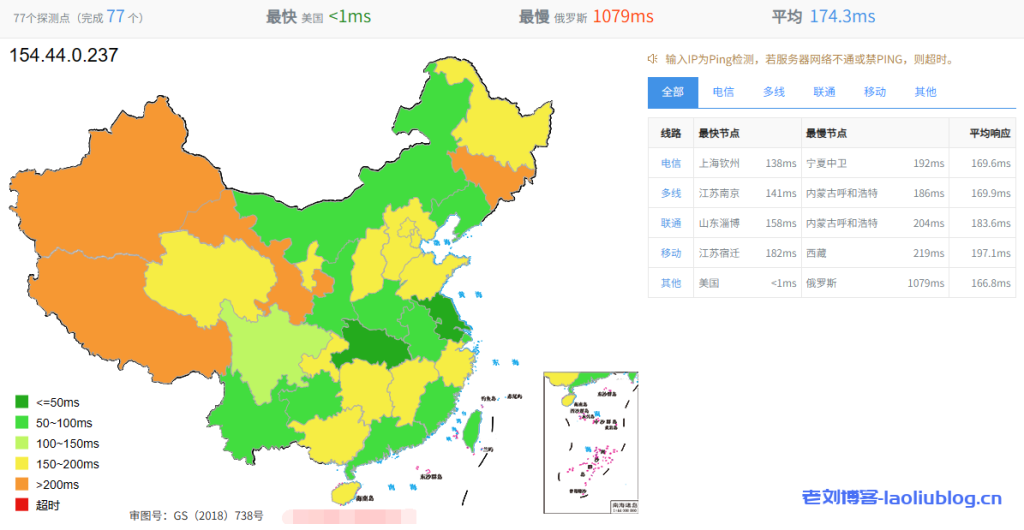
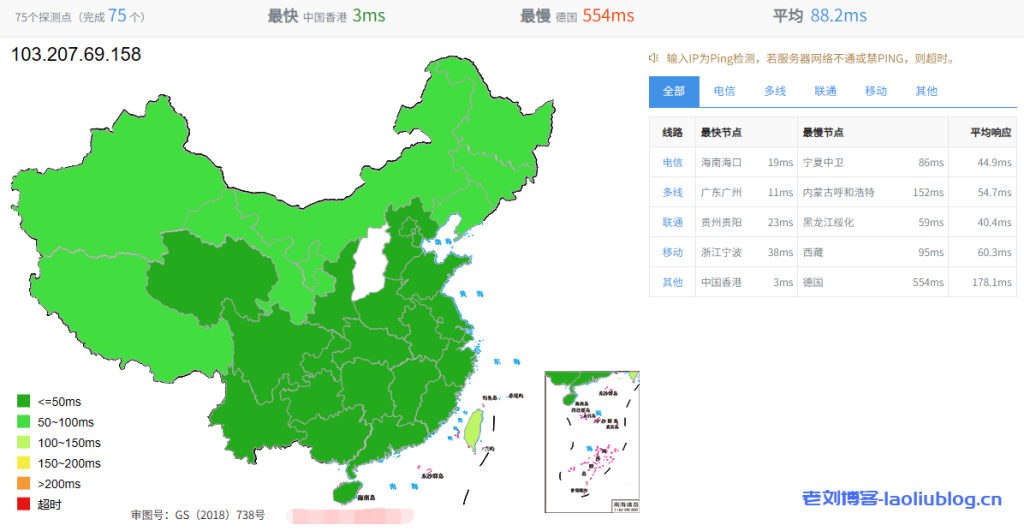
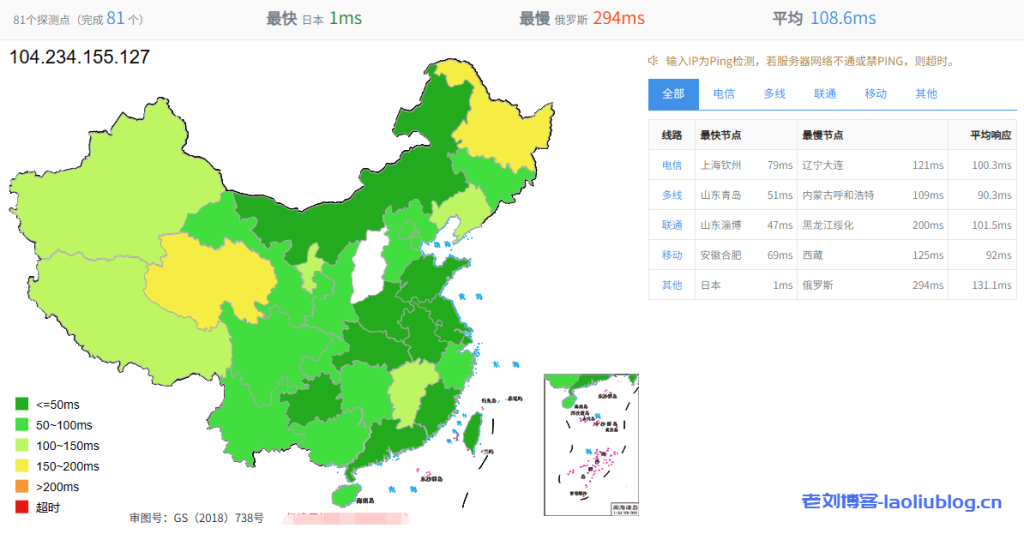
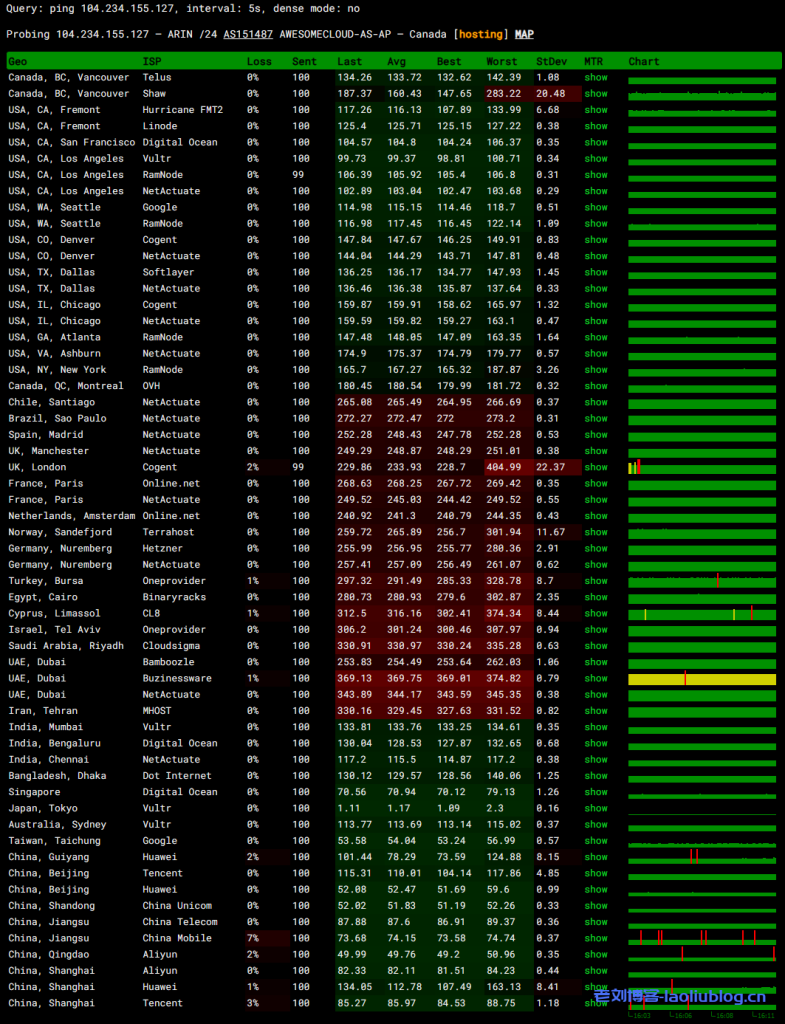
ping网络延迟情况
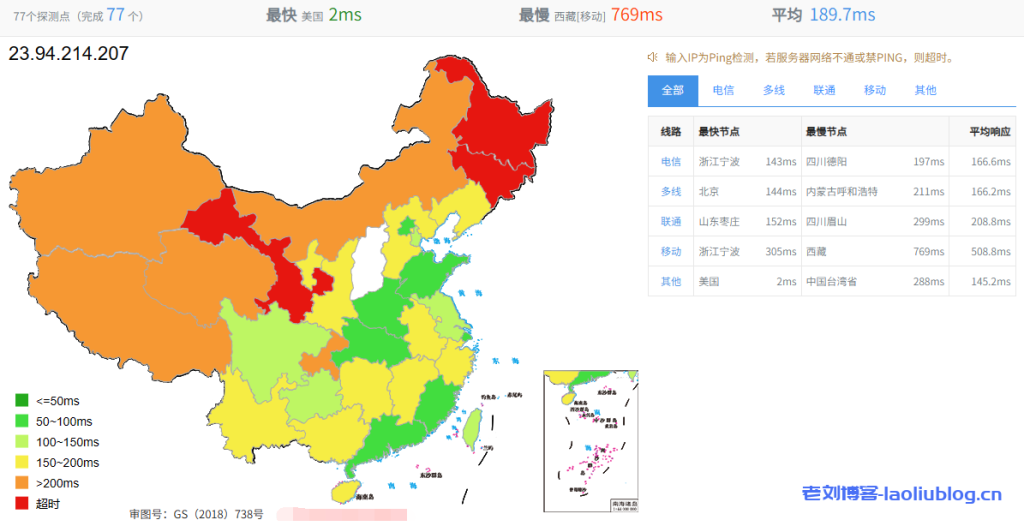
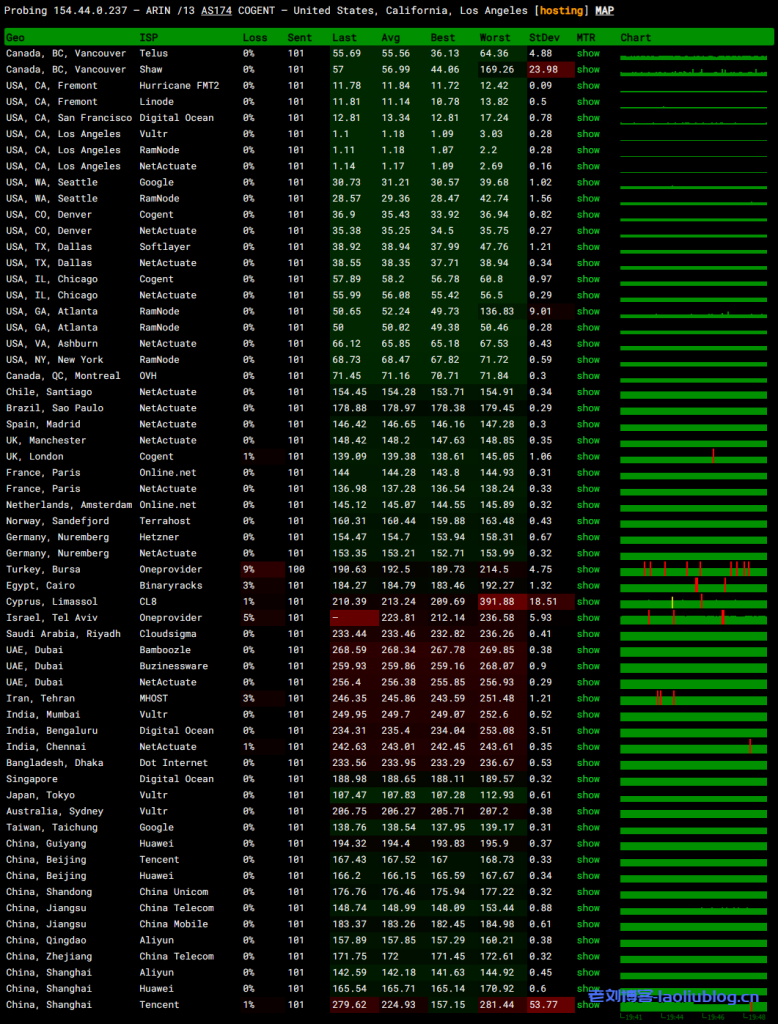
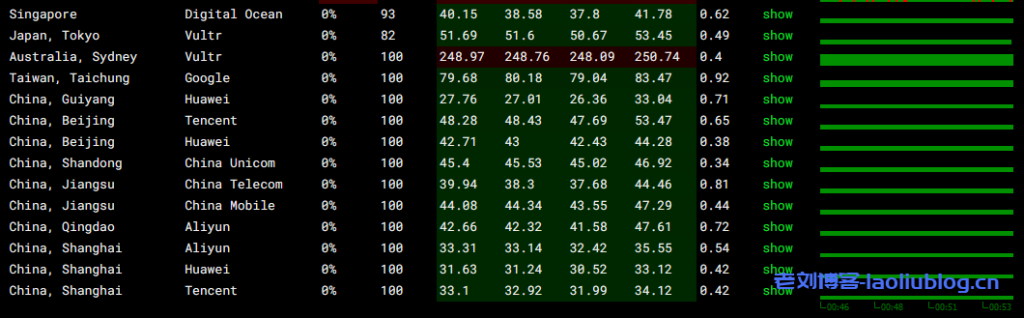
VPS丢包率测试
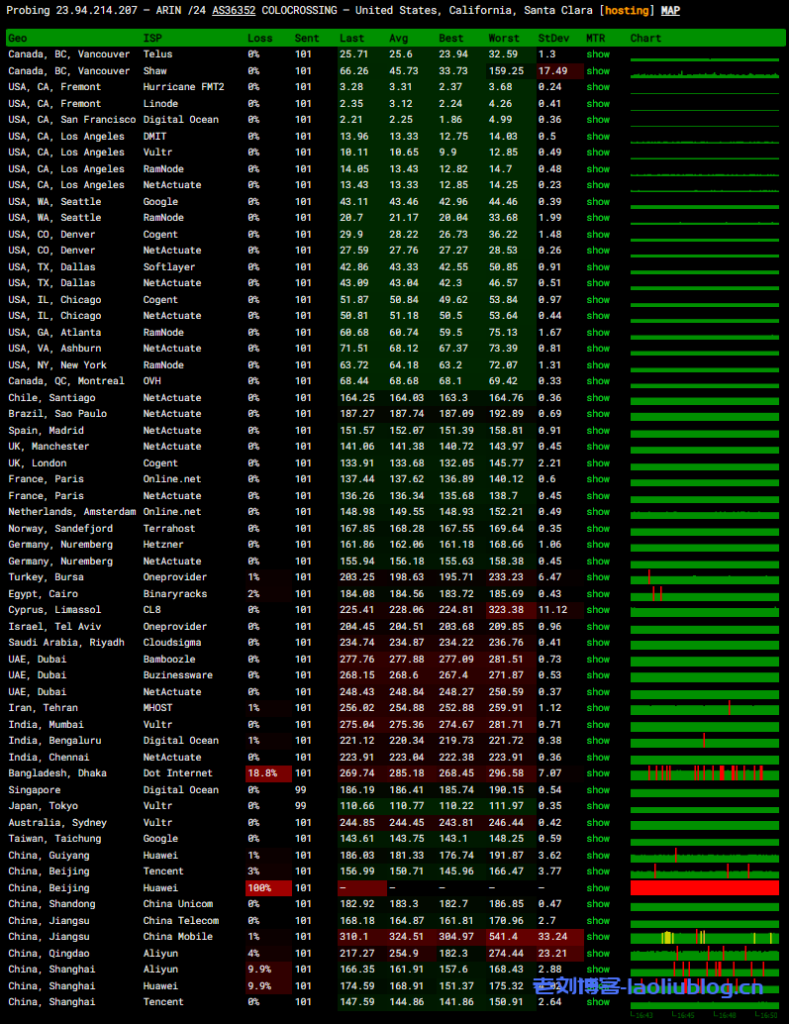
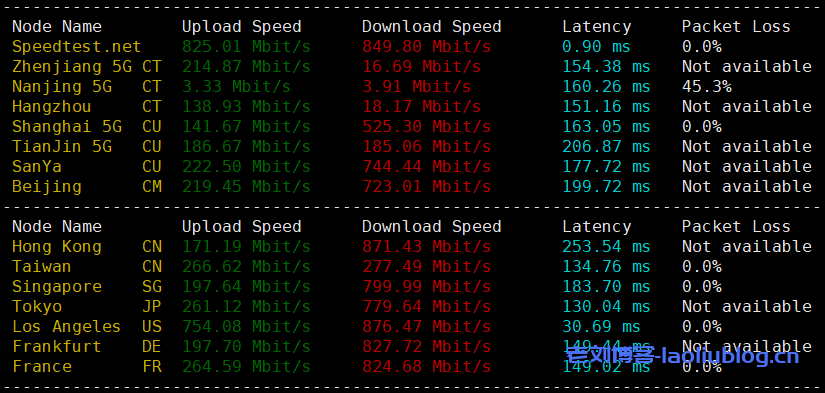
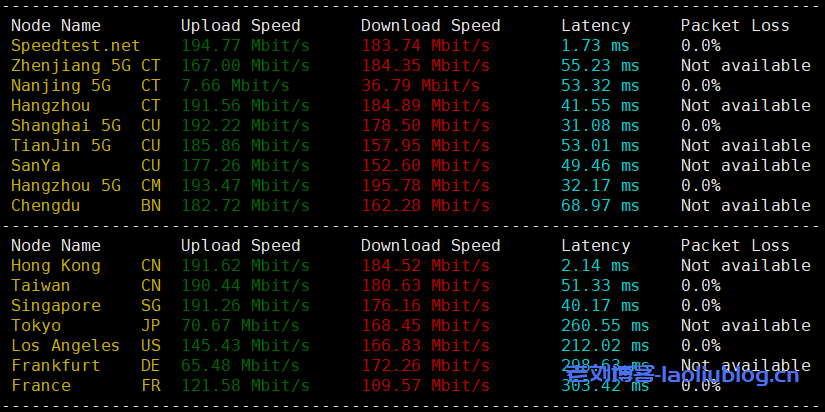
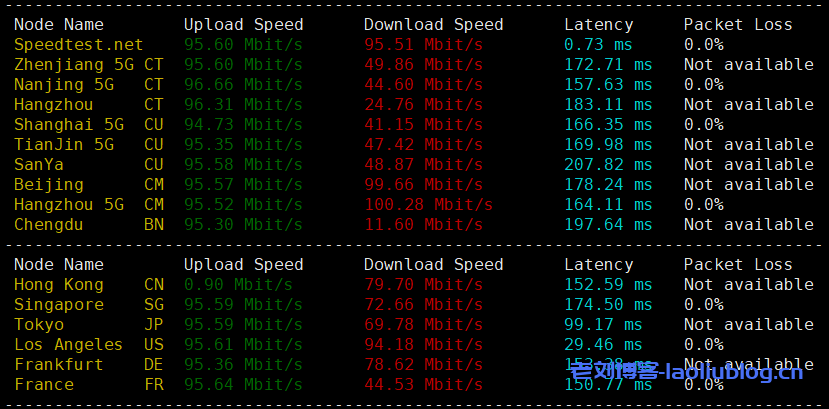
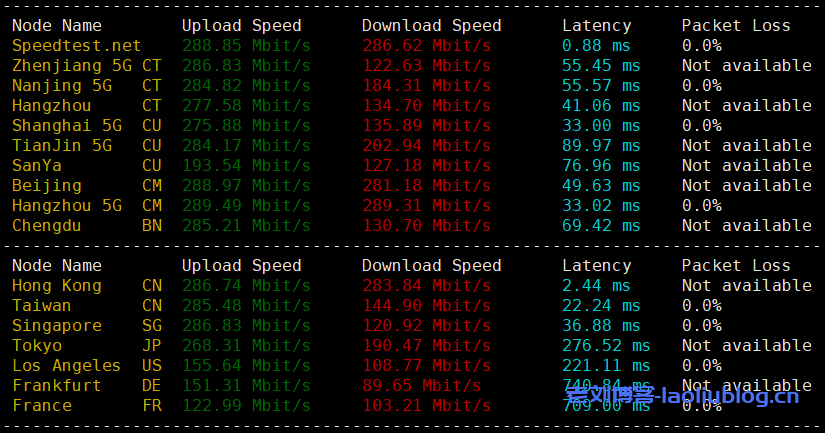
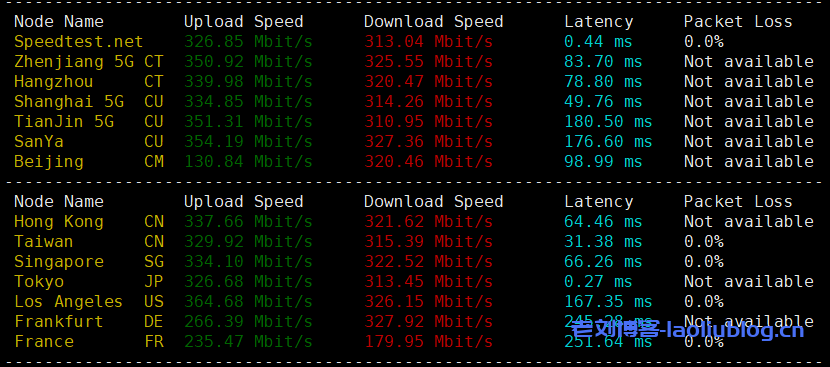
speedtest国内外节点测速
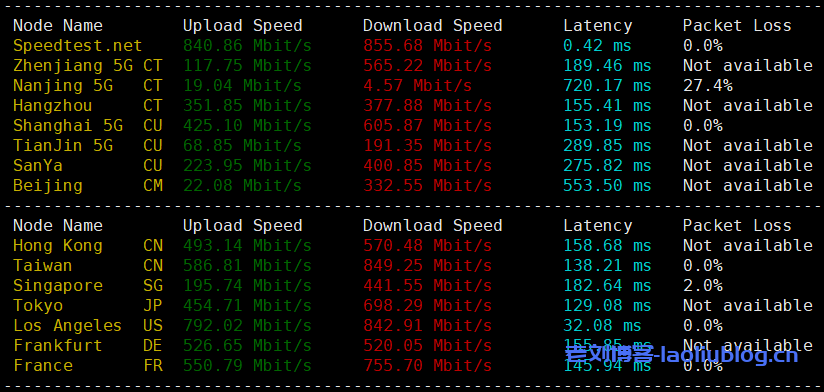
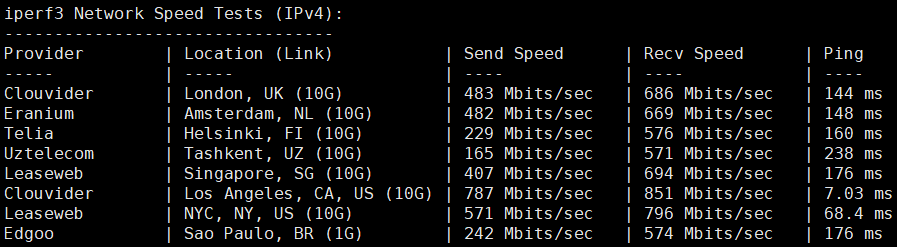
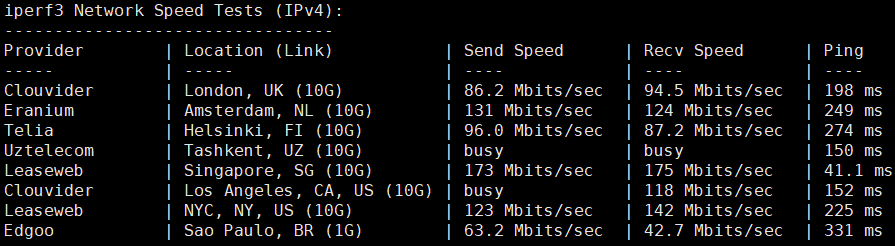
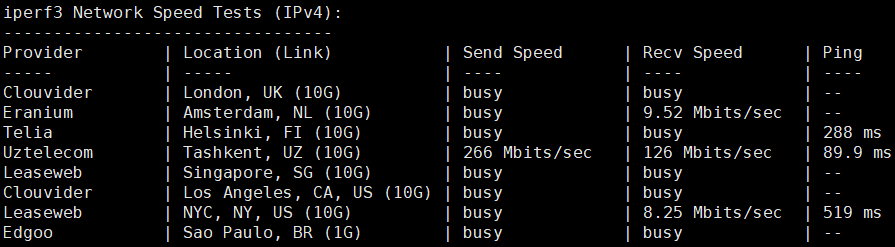
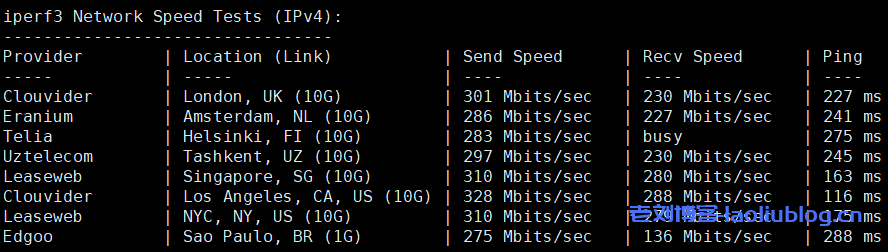
iperf3欧美10G带宽节点测速

亚洲部分节点测速

全球部分节点测速
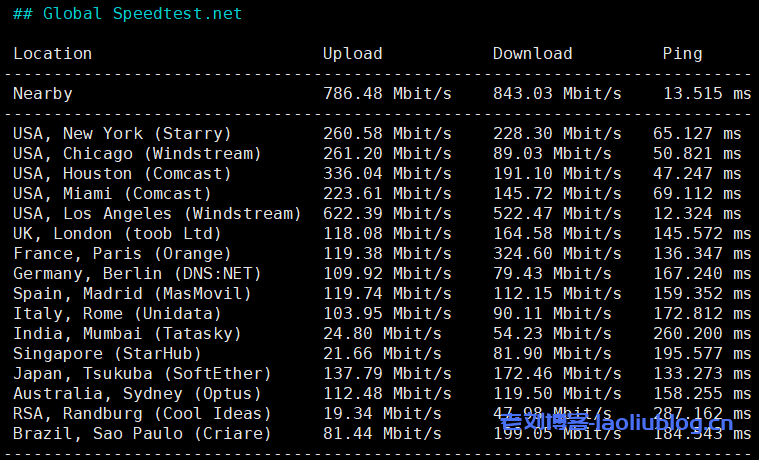
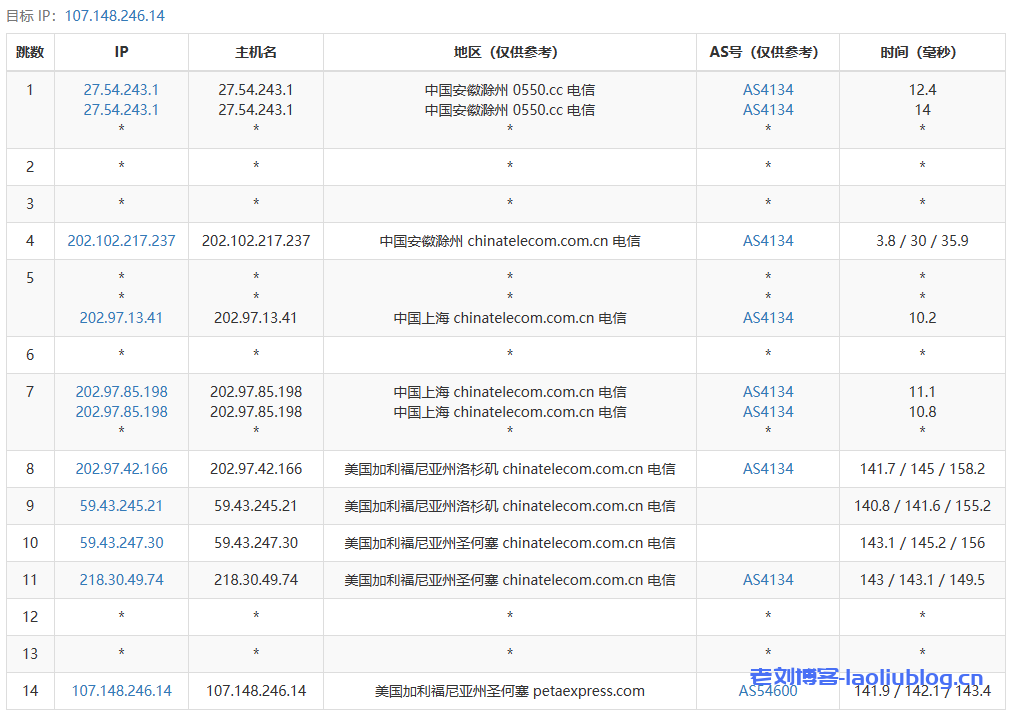
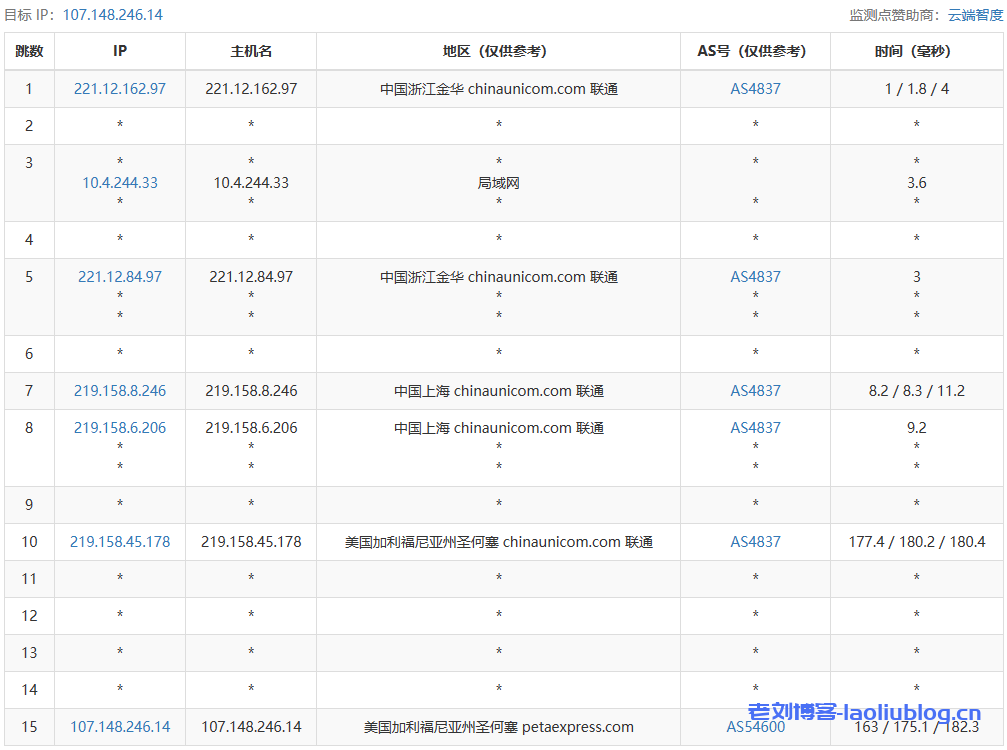
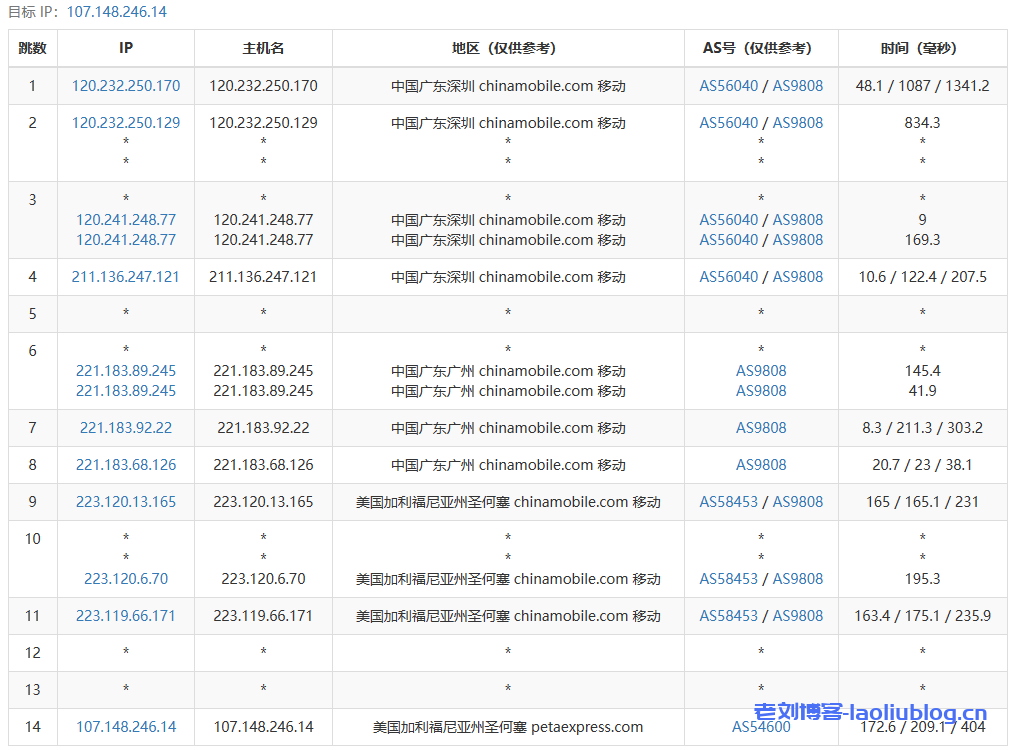
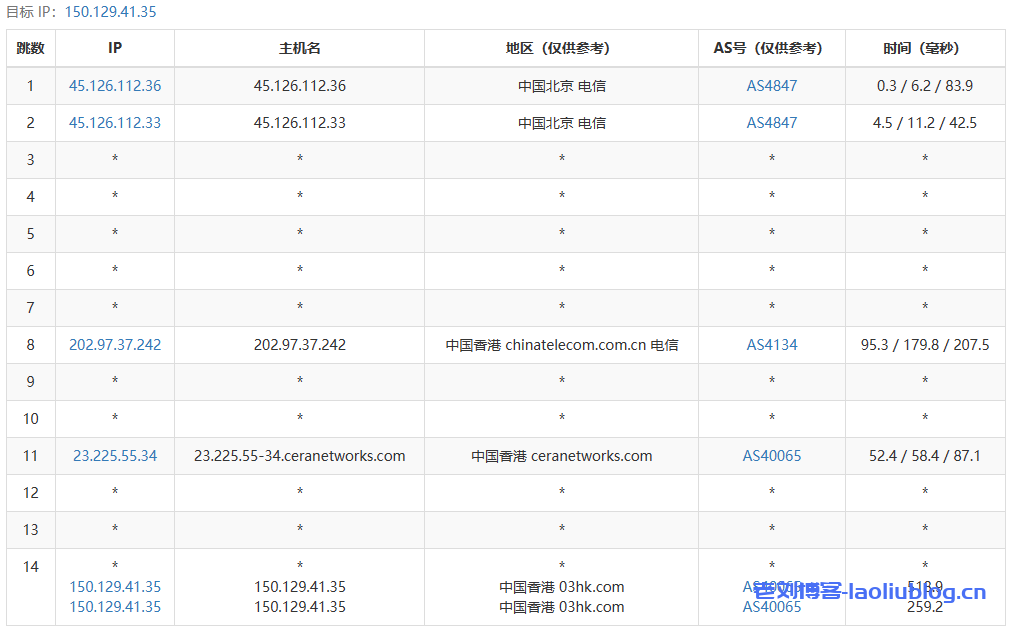
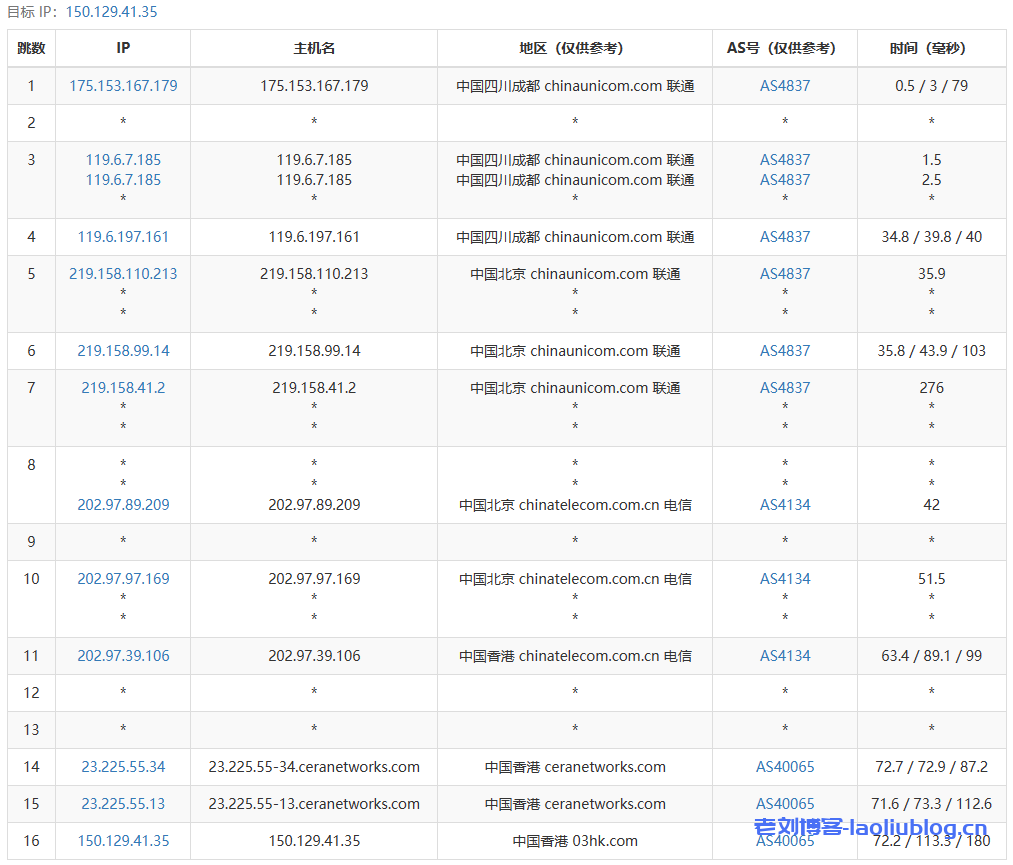
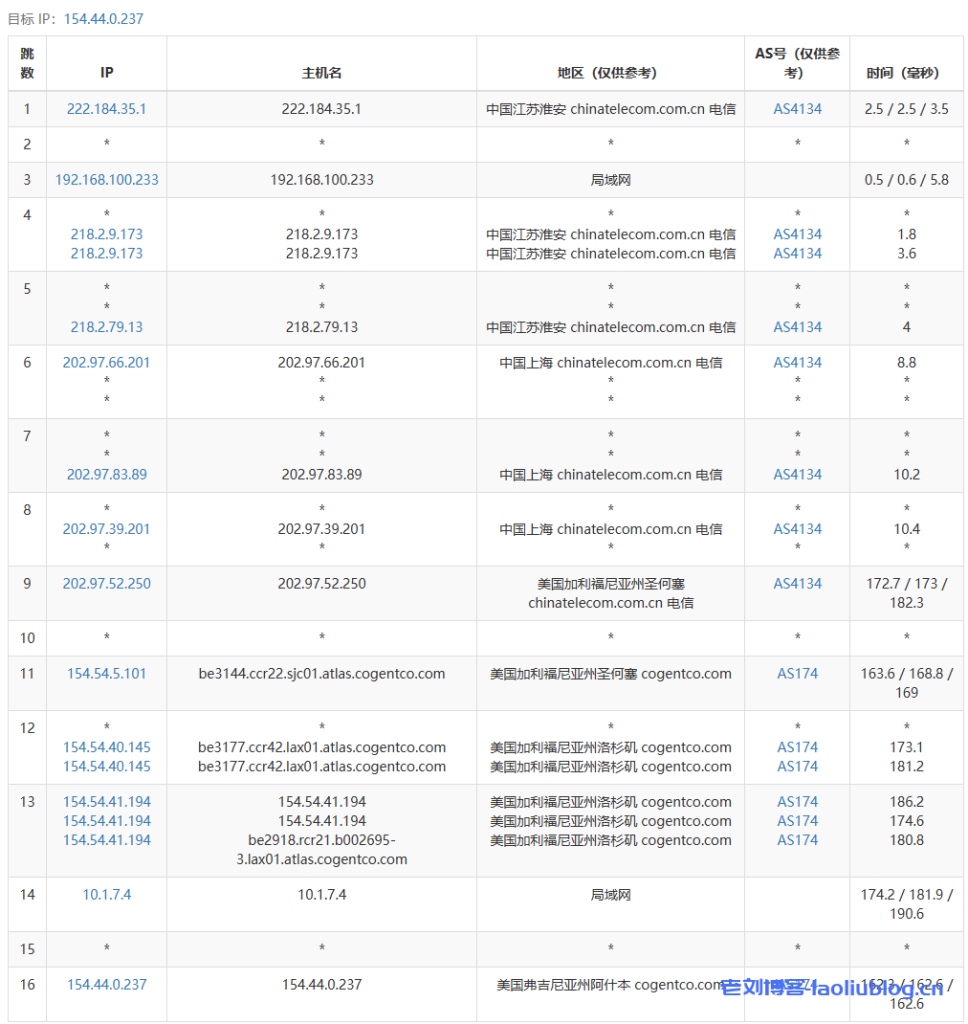
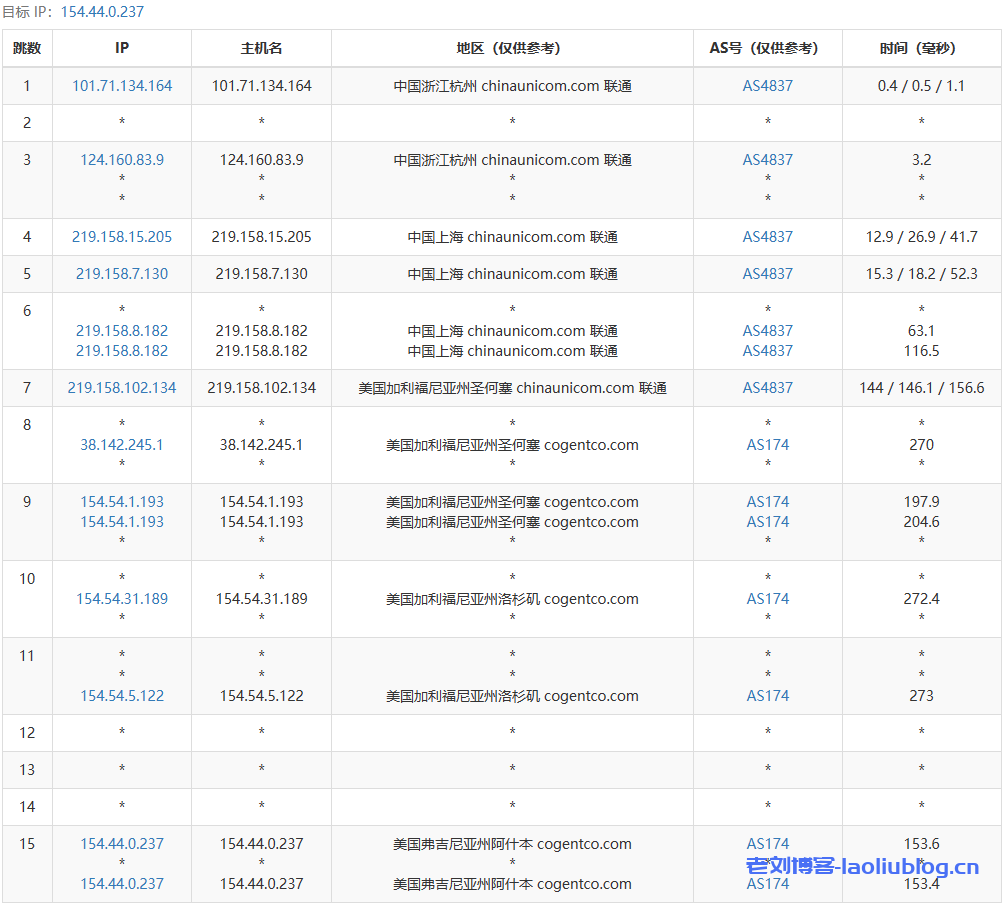
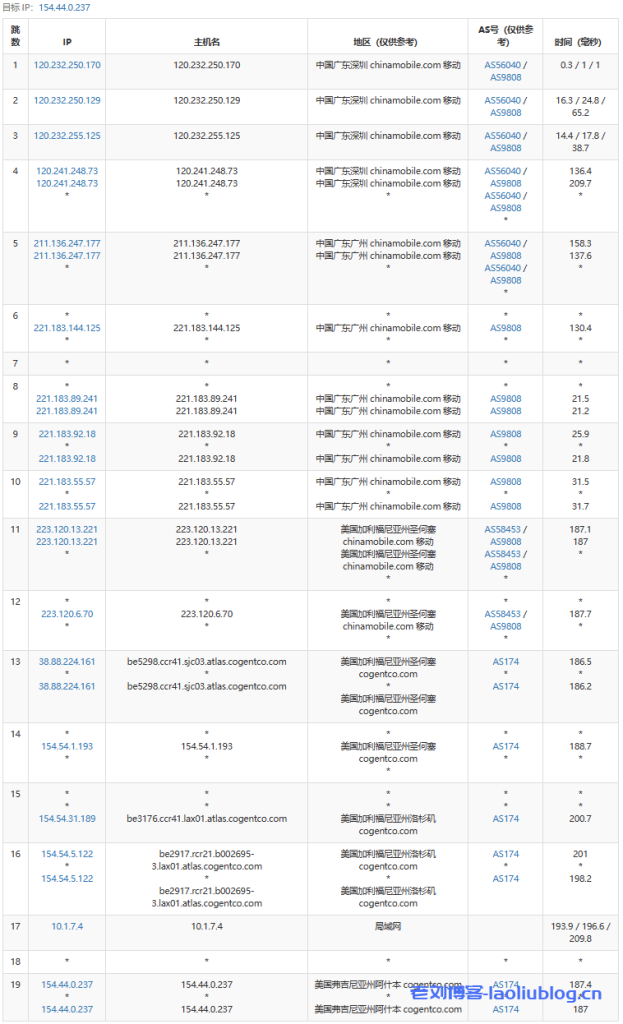
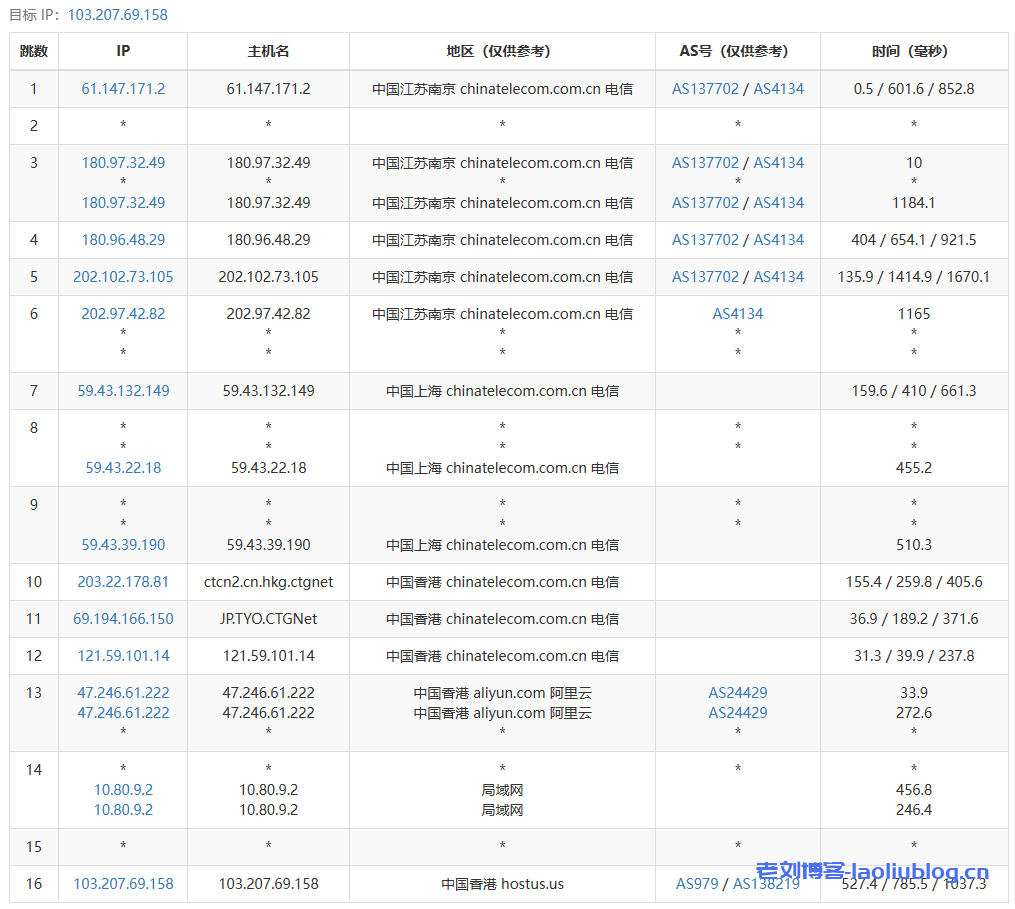
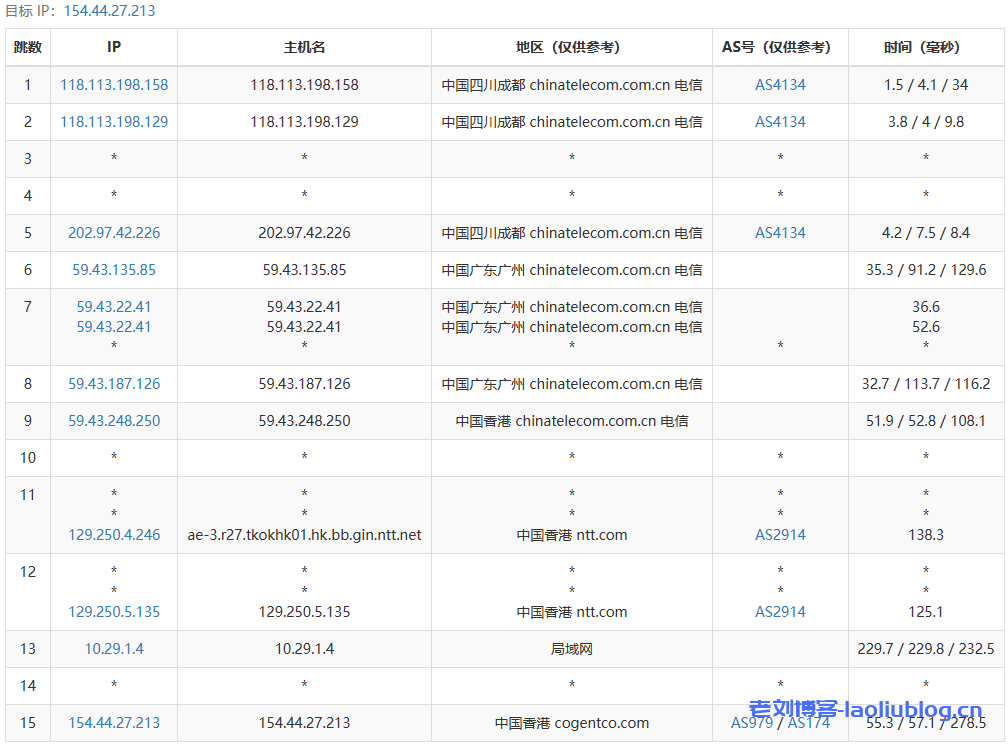
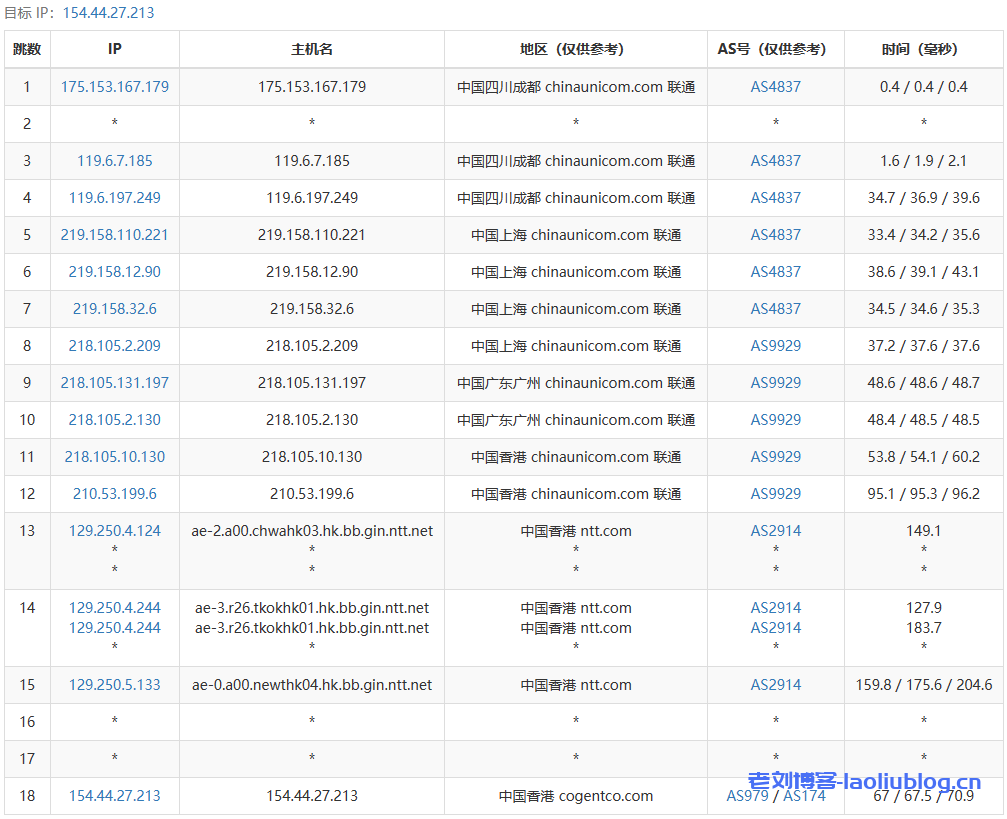
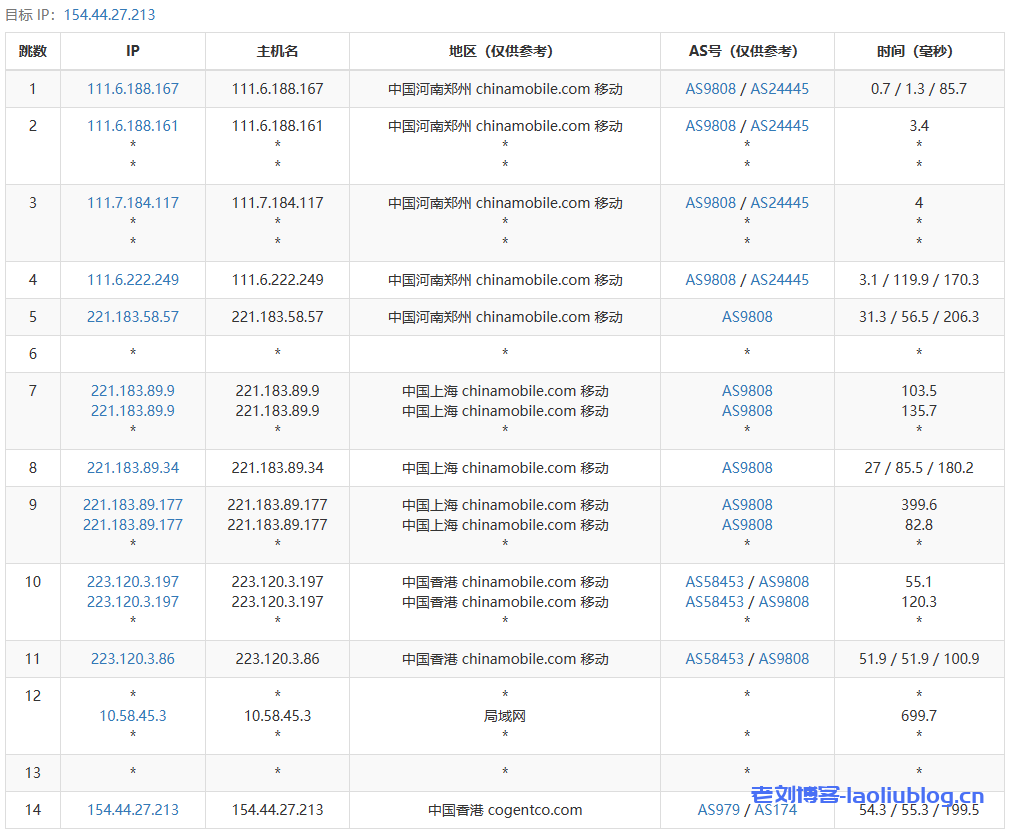
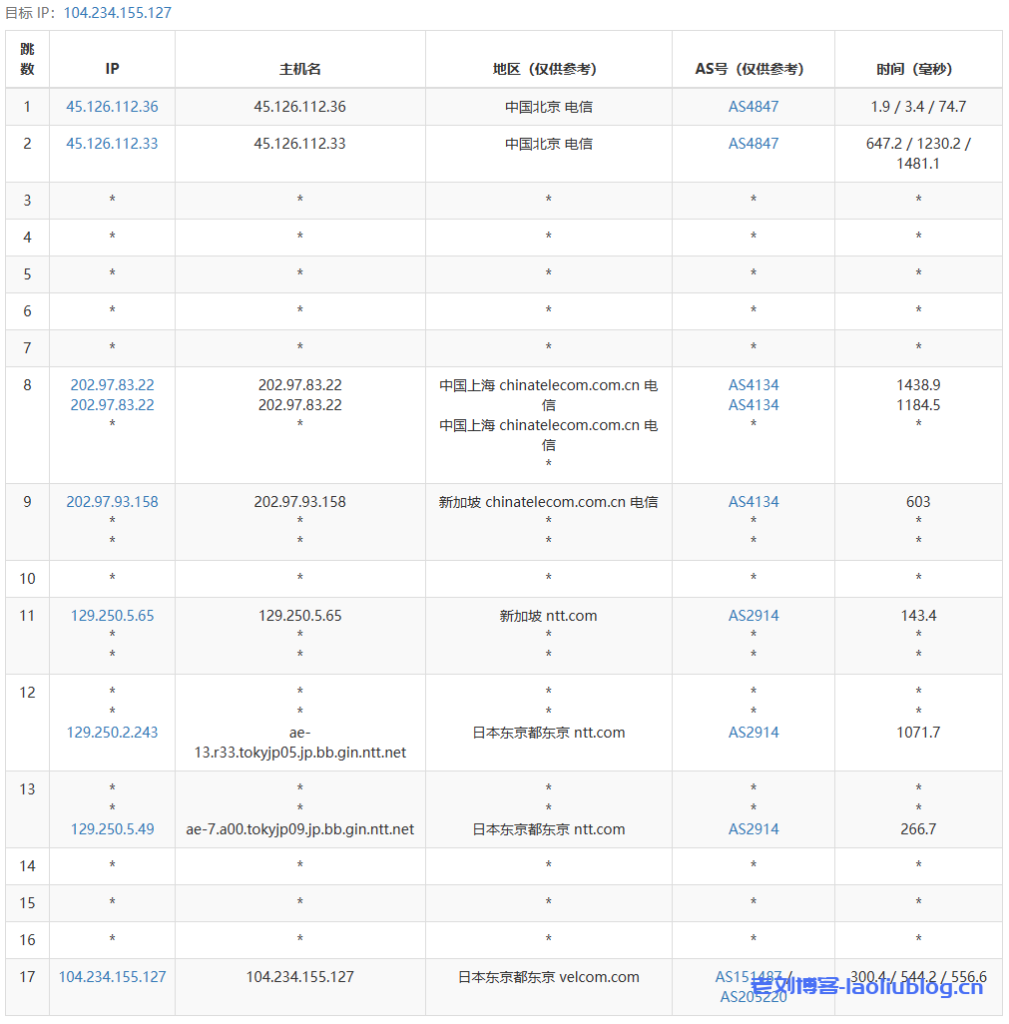
去程路由追踪测试
电信去程

联通去程
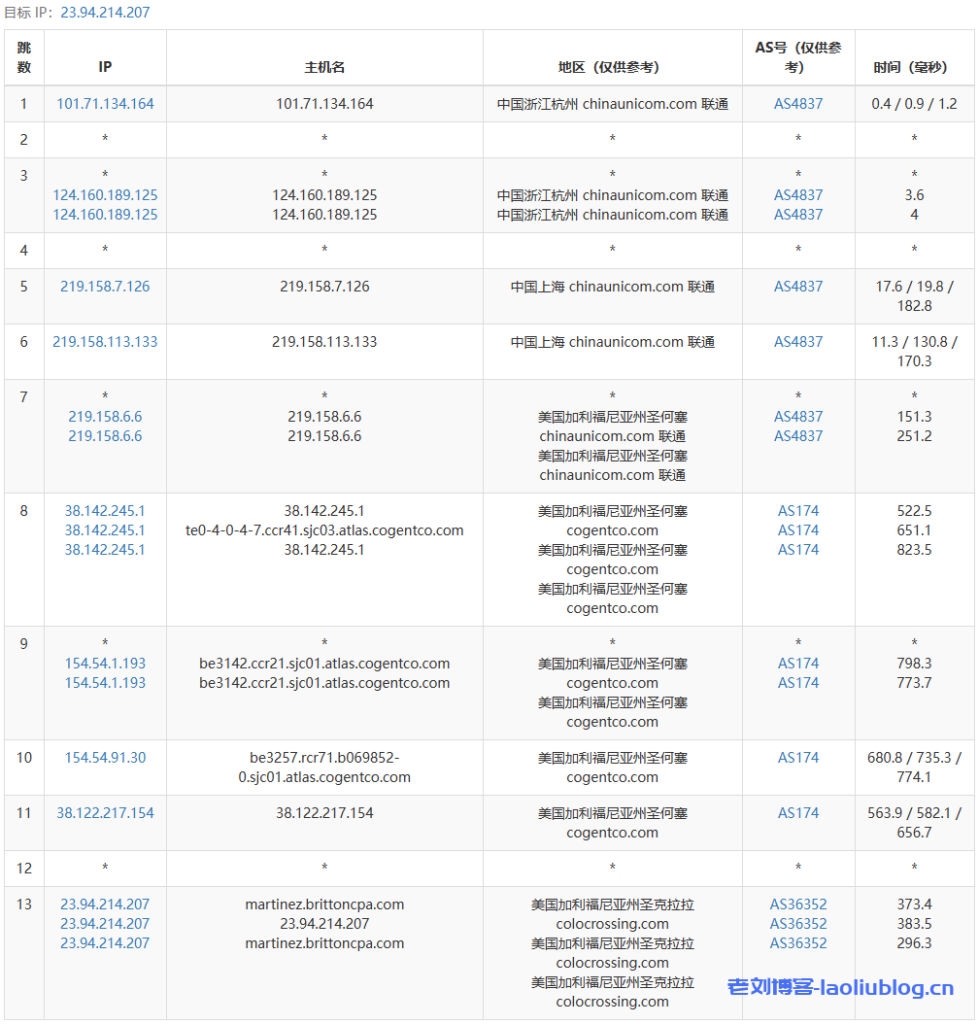
移动去程
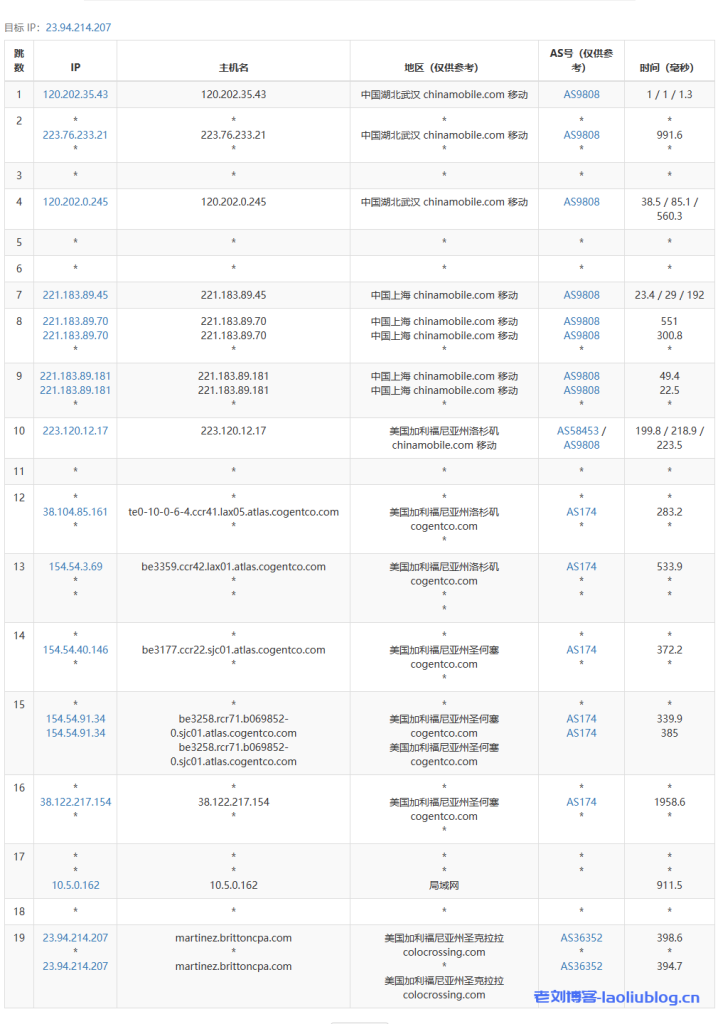
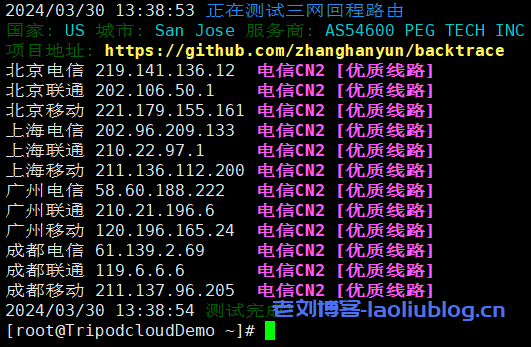
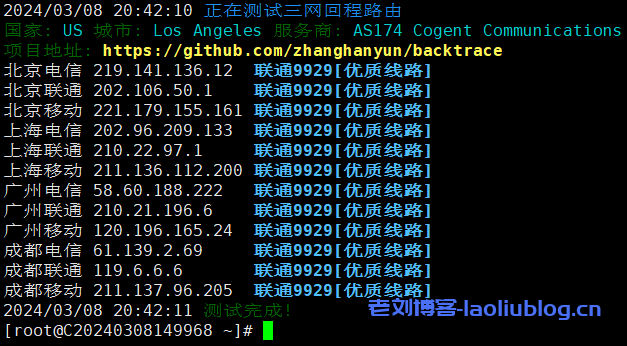
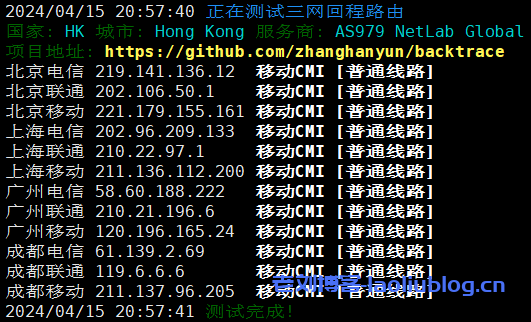
回程路由追踪测试
一键回程路由情况,电信走电信163,联通走联通4837,移动走移动CMI
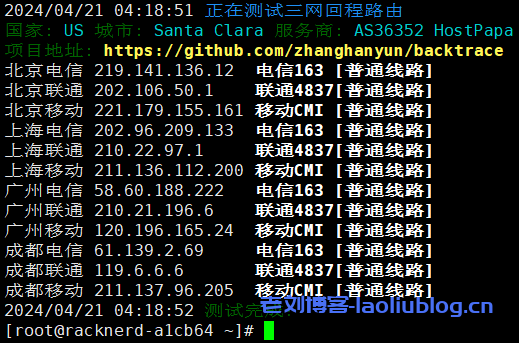
回程路由详情
Traceroute to China, Guangzhou CT (TCP Mode, Max 30 Hop)
============================================================
traceroute to 113.108.209.1 (113.108.209.1), 30 hops max, 32 byte packets
 1  23.94.100.45  0.96 ms  AS36352  United States, California, Santa Clara, colocrossing.com
 2  10.5.0.161  0.88 ms  *  LAN Address
 3  *
 4  154.54.91.33  1.24 ms  AS174  United States, California, San Jose, cogentco.com
 5  154.54.5.102  1.67 ms  AS174  United States, California, San Jose, cogentco.com
 6  38.104.138.106  2.41 ms  AS174  United States, California, San Jose, cogentco.com
 7  202.97.43.121  150.46 ms  AS4134  China, Guangdong, Guangzhou, ChinaTelecom
 8  202.97.12.18  173.10 ms  AS4134  China, Guangdong, Guangzhou, ChinaTelecom
 9  *
10  113.108.209.1  157.25 ms  AS58466  China, Guangdong, Guangzhou, ChinaTelecom


Traceroute to China, Shanghai CT (TCP Mode, Max 30 Hop)
============================================================
traceroute to 180.153.28.5 (180.153.28.5), 30 hops max, 32 byte packets
 1  23.94.100.45  1.48 ms  AS36352  United States, California, Santa Clara, colocrossing.com
 2  10.5.0.57  0.84 ms  *  LAN Address
 3  *
 4  154.54.91.33  0.97 ms  AS174  United States, California, San Jose, cogentco.com
 5  154.54.1.194  1.63 ms  AS174  United States, California, San Jose, cogentco.com
 6  38.104.138.106  3.18 ms  AS174  United States, California, San Jose, cogentco.com
 7  *
 8  *
 9  *
10  *
11  101.95.207.234  157.58 ms  AS4812  China, Shanghai, ChinaTelecom
12  222.73.35.182  163.57 ms  AS4812  China, Shanghai, ChinaTelecom
13  *
14  *
15  *
16  *
17  *
18  *
19  *
20  *
21  *
22  *
23  *
24  *
25  *
26  *
27  *
28  *
29  *
30  *


Traceroute to China, Beijing CT (TCP Mode, Max 30 Hop)
============================================================
traceroute to 180.149.128.9 (180.149.128.9), 30 hops max, 32 byte packets
 1  23.94.100.45  1.16 ms  AS36352  United States, California, Santa Clara, colocrossing.com
 2  10.5.0.57  0.81 ms  *  LAN Address
 3  *
 4  154.54.91.29  1.10 ms  AS174  United States, California, San Jose, cogentco.com
 5  154.54.1.194  17.06 ms  AS174  United States, California, San Jose, cogentco.com
 6  *
 7  *
 8  202.97.12.121  142.27 ms  AS4134  China, Beijing, ChinaTelecom
 9  202.97.48.245  140.52 ms  AS4134  China, Beijing, ChinaTelecom
10  *
11  *
12  *
13  *
14  *
15  *
16  *
17  *
18  *
19  *
20  *
21  *
22  *
23  *
24  *
25  *
26  *
27  *
28  *
29  *
30  *


Traceroute to China, Guangzhou CU (TCP Mode, Max 30 Hop)
============================================================
traceroute to 210.21.4.130 (210.21.4.130), 30 hops max, 32 byte packets
 1  23.94.100.45  1.16 ms  AS36352  United States, California, Santa Clara, colocrossing.com
 2  10.5.0.161  0.87 ms  *  LAN Address
 3  *
 4  154.54.91.33  1.34 ms  AS174  United States, California, San Jose, cogentco.com
 5  154.54.40.145  13.09 ms  AS174  United States, California, Los Angeles, cogentco.com
 6  154.54.91.14  13.52 ms  AS174  United States, California, Los Angeles, cogentco.com
 7  38.140.129.90  159.21 ms  AS174  United States, California, Los Angeles, cogentco.com
 8  219.158.97.209  192.87 ms  AS4837  China, Guangdong, Guangzhou, ChinaUnicom
 9  219.158.103.37  178.64 ms  AS4837  China, Guangdong, Guangzhou, ChinaUnicom
10  219.158.8.117  173.84 ms  AS4837  China, Guangdong, Guangzhou, ChinaUnicom
11  157.18.0.158  188.21 ms  AS17816  China, Guangdong, Guangzhou, ChinaUnicom
12  120.80.175.78  185.90 ms  AS17622  China, Guangdong, Guangzhou, ChinaUnicom
13  *
14  *
15  *
16  *
17  *
18  *
19  *
20  *
21  *
22  *
23  *
24  *
25  *
26  *
27  *
28  *
29  *
30  *


Traceroute to China, Shanghai CU (TCP Mode, Max 30 Hop)
============================================================
traceroute to 58.247.8.158 (58.247.8.158), 30 hops max, 32 byte packets
 1  23.94.100.45  1.31 ms  AS36352  United States, California, Santa Clara, colocrossing.com
 2  10.5.0.161  0.80 ms  *  LAN Address
 3  *
 4  154.54.91.33  1.16 ms  AS174  United States, California, San Jose, cogentco.com
 5  154.54.5.102  1.83 ms  AS174  United States, California, San Jose, cogentco.com
 6  38.142.245.10  2.04 ms  AS174  United States, California, San Jose, cogentco.com
 7  219.158.116.237  159.97 ms  AS4837  China, Shanghai, ChinaUnicom
 8  219.158.19.90  165.93 ms  AS4837  China, Shanghai, ChinaUnicom
 9  *
10  *
11  *
12  58.247.8.153  176.63 ms  AS17621  China, Shanghai, ChinaUnicom
13  *
14  *
15  *
16  *
17  *
18  *
19  *
20  *
21  *
22  *
23  *
24  *
25  *
26  *
27  *
28  *
29  *
30  *


Traceroute to China, Beijing CU (TCP Mode, Max 30 Hop)
============================================================
traceroute to 123.125.99.1 (123.125.99.1), 30 hops max, 32 byte packets
 1  23.94.100.45  1.24 ms  AS36352  United States, California, Santa Clara, colocrossing.com
 2  10.5.0.161  0.88 ms  *  LAN Address
 3  *
 4  154.54.91.33  1.19 ms  AS174  United States, California, San Jose, cogentco.com
 5  154.54.1.194  1.43 ms  AS174  United States, California, San Jose, cogentco.com
 6  38.88.224.14  1.24 ms  AS174  United States, California, San Jose, cogentco.com
 7  219.158.96.41  195.88 ms  AS4837  China, Beijing, ChinaUnicom
 8  *
 9  *
10  125.33.186.102  168.91 ms  AS4808  China, Beijing, ChinaUnicom
11  61.51.169.174  190.83 ms  AS4808  China, Beijing, ChinaUnicom
12  *
13  *
14  123.125.99.1  171.14 ms  AS4808  China, Beijing, ChinaUnicom


Traceroute to China, Guangzhou CM (TCP Mode, Max 30 Hop)
============================================================
traceroute to 120.196.212.25 (120.196.212.25), 30 hops max, 32 byte packets
 1  23.94.100.45  1.06 ms  AS36352  United States, California, Santa Clara, colocrossing.com
 2  10.5.0.161  0.81 ms  *  LAN Address
 3  *
 4  154.54.91.33  35.90 ms  AS174  United States, California, San Jose, cogentco.com
 5  154.54.31.189  13.53 ms  AS174  United States, California, Los Angeles, cogentco.com
 6  154.54.27.118  13.56 ms  AS174  United States, California, Los Angeles, cogentco.com
 7  38.19.140.98  21.42 ms  AS174  United States, California, Los Angeles, cogentco.com
 8  223.120.6.97  14.11 ms  AS58453  United States, California, Los Angeles, ChinaMobile
 9  223.120.12.42  182.72 ms  AS58453  China, Hong Kong, ChinaMobile
10  221.183.55.58  168.77 ms  AS9808  China, Guangdong, Guangzhou, ChinaMobile
11  *
12  *
13  *
14  183.235.232.185  189.74 ms  AS56040  China, Guangdong, Guangzhou, ChinaMobile
15  211.136.196.206  171.62 ms  AS56040  China, Guangdong, Guangzhou, ChinaMobile
16  211.136.196.242  177.36 ms  AS56040  China, Guangdong, Guangzhou, ChinaMobile
17  211.139.180.110  177.88 ms  AS56040  China, Guangdong, Guangzhou, ChinaMobile
18  120.197.234.140  188.83 ms  AS56040  China, Guangdong, Guangzhou, ChinaMobile
19  120.196.212.25  177.42 ms  AS56040  China, Guangdong, Guangzhou, ChinaMobile


Traceroute to China, Shanghai CM (TCP Mode, Max 30 Hop)
============================================================
traceroute to 221.183.55.22 (221.183.55.22), 30 hops max, 32 byte packets
 1  23.94.100.45  1.01 ms  AS36352  United States, California, Santa Clara, colocrossing.com
 2  10.5.0.161  0.76 ms  *  LAN Address
 3  *
 4  154.54.91.29  1.17 ms  AS174  United States, California, San Jose, cogentco.com
 5  154.54.1.194  2.23 ms  AS174  United States, California, San Jose, cogentco.com
 6  38.88.224.162  1.94 ms  AS174  United States, California, San Jose, cogentco.com
 7  223.120.6.69  1.49 ms  AS58453  United States, California, San Jose, ChinaMobile
 8  223.120.12.142  181.20 ms  AS58453  China, Shanghai, ChinaMobile
 9  221.183.89.170  191.91 ms  AS9808  China, Shanghai, ChinaMobile
10  *
11  *
12  *
13  *
14  *
15  *
16  *
17  *
18  *
19  *
20  *
21  *
22  *
23  *
24  *
25  *
26  *
27  *
28  *
29  *
30  *


Traceroute to China, Beijing CM (TCP Mode, Max 30 Hop)
============================================================
traceroute to 211.136.25.153 (211.136.25.153), 30 hops max, 32 byte packets
 1  23.94.100.45  1.31 ms  AS36352  United States, California, Santa Clara, colocrossing.com
 2  10.5.0.161  0.73 ms  *  LAN Address
 3  *
 4  154.54.91.33  1.88 ms  AS174  United States, California, San Jose, cogentco.com
 5  154.54.40.145  18.60 ms  AS174  United States, California, Los Angeles, cogentco.com
 6  154.54.3.70  13.36 ms  AS174  United States, California, Los Angeles, cogentco.com
 7  38.104.85.162  136.37 ms  AS174  United States, California, Los Angeles, cogentco.com
 8  223.120.6.217  76.46 ms  AS58453  United States, California, Los Angeles, ChinaMobile
 9  223.120.12.214  423.44 ms  AS58453  China, Beijing, ChinaMobile
10  *
11  221.183.46.250  390.65 ms  AS9808  China, Beijing, ChinaMobile
12  221.183.89.102  474.81 ms  AS9808  China, Beijing, ChinaMobile
13  *
14  *
15  *
16  211.136.67.166  274.83 ms  AS56048  China, Beijing, ChinaMobile
17  *
18  *
19  211.136.25.153  341.71 ms  AS56048  China, Beijing, ChinaMobile


Traceroute to China, Beijing Dr.Peng Network IDC Network (TCP Mode, Max 30 Hop)
============================================================
traceroute to 211.167.230.100 (211.167.230.100), 30 hops max, 32 byte packets
 1  23.94.100.45  1.46 ms  AS36352  United States, California, Santa Clara, colocrossing.com
 2  10.5.0.161  0.78 ms  *  LAN Address
 3  *
 4  154.54.91.33  1.72 ms  AS174  United States, California, San Jose, cogentco.com
 5  154.54.1.194  1.96 ms  AS174  United States, California, San Jose, cogentco.com
 6  38.142.244.90  4.32 ms  AS174  United States, California, San Jose, cogentco.com
 7  *
 8  219.158.10.9  148.41 ms  AS4837  China, Beijing, ChinaUnicom
 9  *
10  *
11  114.249.179.70  169.77 ms  AS4808  China, Beijing, ChinaUnicom
12  61.149.212.242  147.06 ms  AS4808  China, Beijing, ChinaUnicom
13  202.99.1.238  170.10 ms  AS4808  China, Beijing, ChinaUnicom
14  218.241.166.18  145.64 ms  AS4808  China, Beijing, DRPENG
15  218.241.253.134  146.63 ms  AS4808  China, Beijing, DRPENG
16  211.167.230.100  167.99 ms  AS17964  China, Beijing, DRPENG

----------------------------------------------------------------------------------
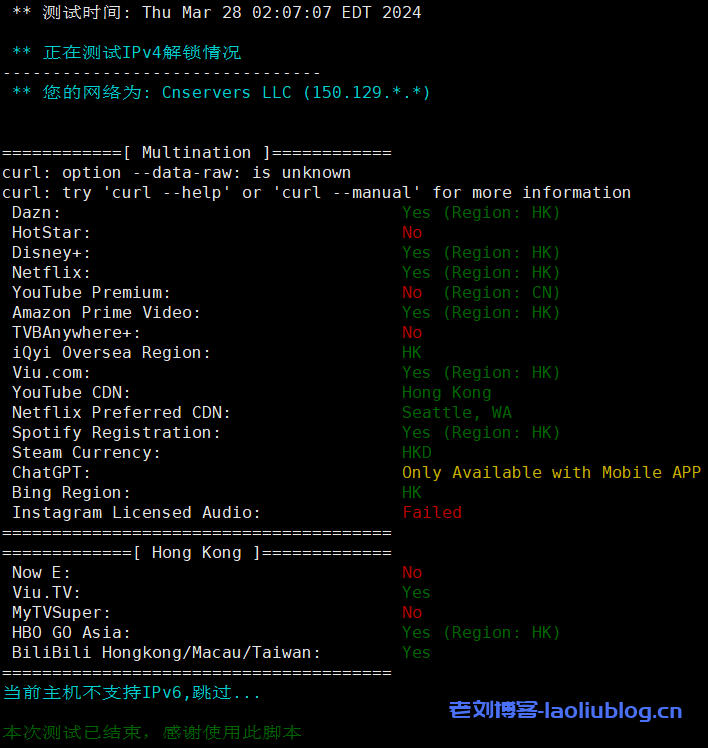
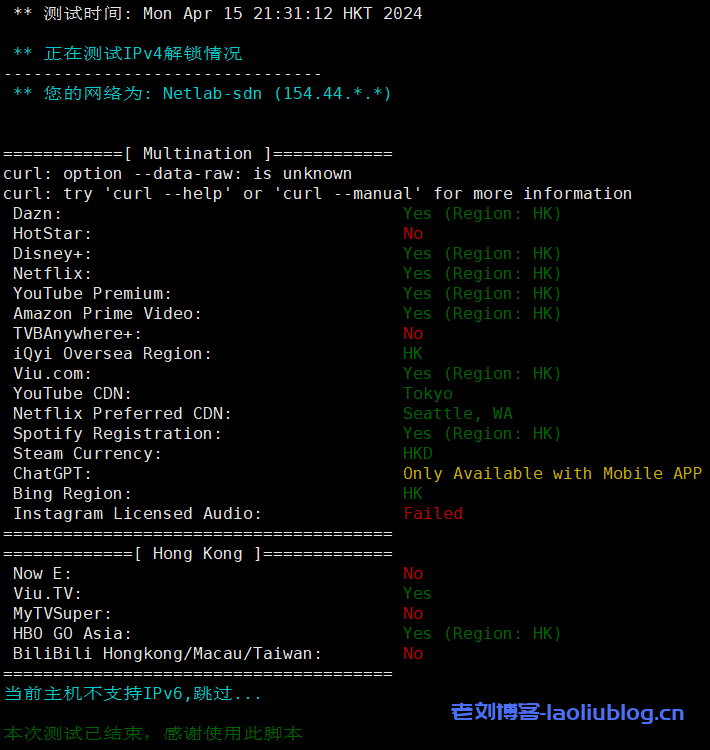
其他流媒体解锁情况
VPS一些性能参数

![VmShell怎么样?简单评测年付60刀的香港CMI VPS[CMI-US-ChatGPT],支持美区ChatGPT](https://www.laoliublog.cn/wp-content/uploads/2024/04/image-58.png)
![VmShell怎么样?简单评测年付60刀的香港CMI VPS[CMI-US-ChatGPT],支持美区ChatGPT](https://www.laoliublog.cn/wp-content/uploads/2024/04/image-56.png)
![VmShell怎么样?简单评测年付60刀的香港CMI VPS[CMI-US-ChatGPT],支持美区ChatGPT](https://www.laoliublog.cn/wp-content/uploads/2024/04/image-48-1024x526.png)
![VmShell怎么样?简单评测年付60刀的香港CMI VPS[CMI-US-ChatGPT],支持美区ChatGPT](https://www.laoliublog.cn/wp-content/uploads/2024/04/image-49-1024x928.png)
![VmShell怎么样?简单评测年付60刀的香港CMI VPS[CMI-US-ChatGPT],支持美区ChatGPT](https://www.laoliublog.cn/wp-content/uploads/2024/04/image-59.png)
![VmShell怎么样?简单评测年付60刀的香港CMI VPS[CMI-US-ChatGPT],支持美区ChatGPT](https://www.laoliublog.cn/wp-content/uploads/2024/04/image-57.png)
![VmShell怎么样?简单评测年付60刀的香港CMI VPS[CMI-US-ChatGPT],支持美区ChatGPT](https://www.laoliublog.cn/wp-content/uploads/2024/04/image-50.png)
![VmShell怎么样?简单评测年付60刀的香港CMI VPS[CMI-US-ChatGPT],支持美区ChatGPT](https://www.laoliublog.cn/wp-content/uploads/2024/04/image-51.png)
![VmShell怎么样?简单评测年付60刀的香港CMI VPS[CMI-US-ChatGPT],支持美区ChatGPT](https://www.laoliublog.cn/wp-content/uploads/2024/04/image-52.png)
![VmShell怎么样?简单评测年付60刀的香港CMI VPS[CMI-US-ChatGPT],支持美区ChatGPT](https://www.laoliublog.cn/wp-content/uploads/2024/04/image-54.png)
![VmShell怎么样?简单评测年付60刀的香港CMI VPS[CMI-US-ChatGPT],支持美区ChatGPT](https://www.laoliublog.cn/wp-content/uploads/2024/04/image-55.png)
![VmShell怎么样?简单评测年付60刀的香港CMI VPS[CMI-US-ChatGPT],支持美区ChatGPT](https://www.laoliublog.cn/wp-content/uploads/2024/04/image-53.png)
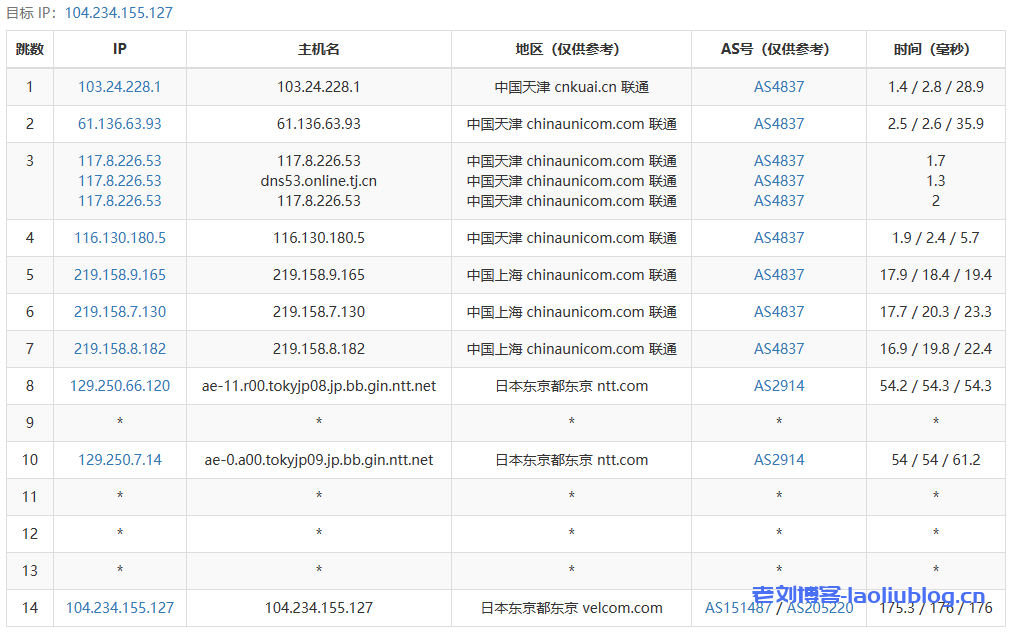
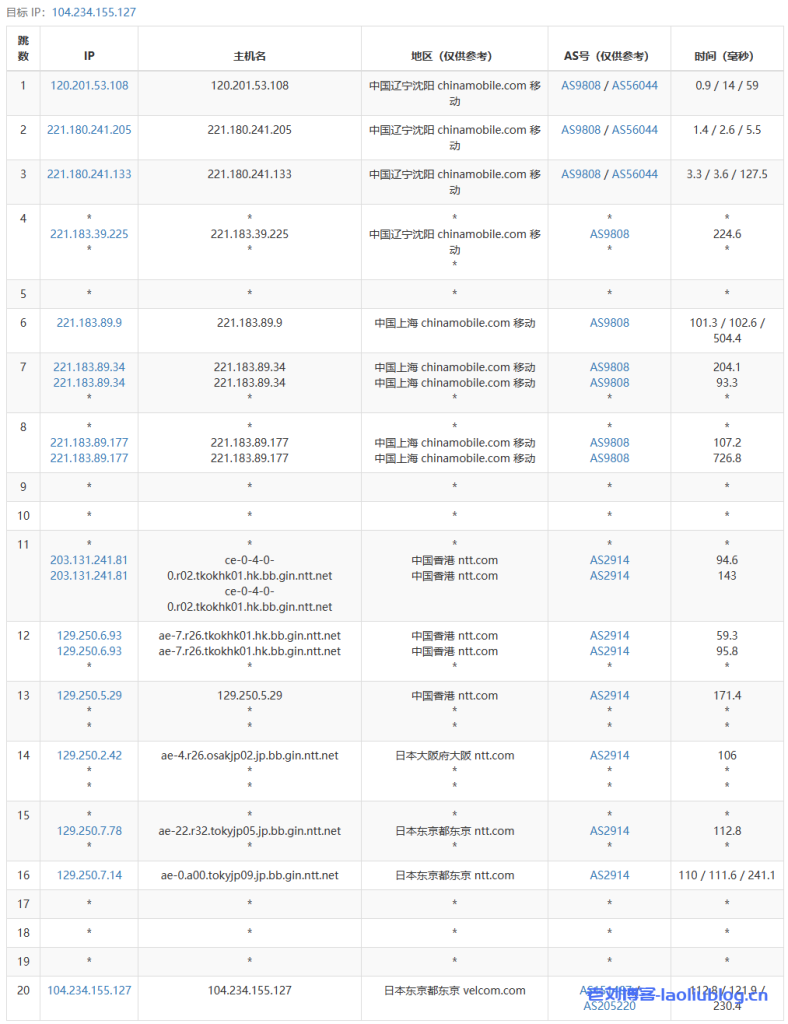
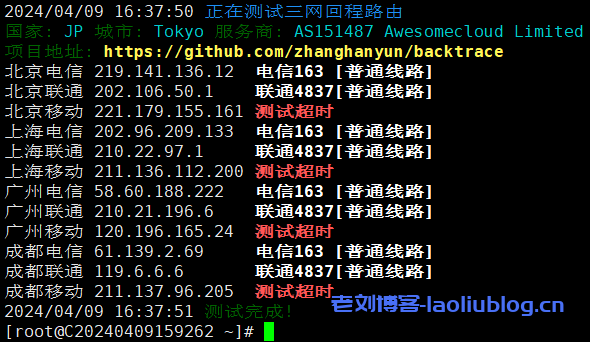
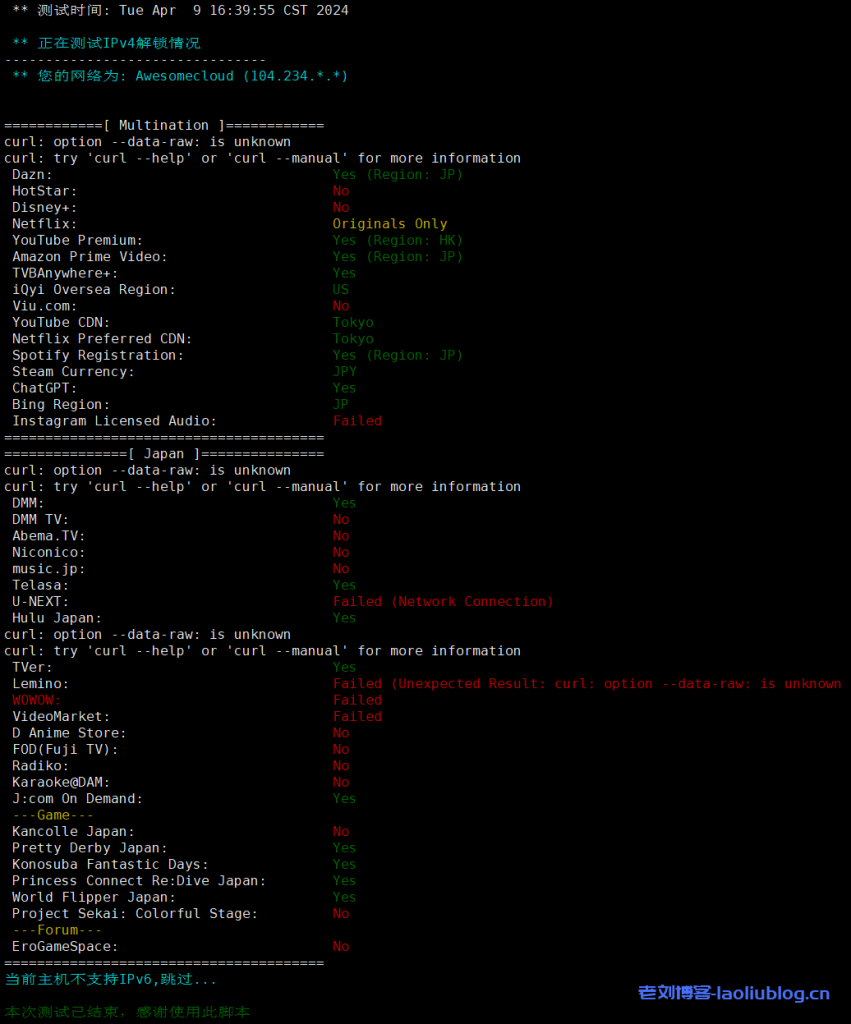

![主机测评:VMISS香港BGP VPS新品[CN-Hong Kong-BGP V3]怎么样?](https://www.laoliublog.cn/wp-content/uploads/2024/04/image-12-1024x490.png)
![主机测评:VMISS香港BGP VPS新品[CN-Hong Kong-BGP V3]怎么样?](https://www.laoliublog.cn/wp-content/uploads/2024/04/image-6.png)
![主机测评:VMISS香港BGP VPS新品[CN-Hong Kong-BGP V3]怎么样?](https://www.laoliublog.cn/wp-content/uploads/2024/04/image-11.png)
![主机测评:VMISS香港BGP VPS新品[CN-Hong Kong-BGP V3]怎么样?](https://www.laoliublog.cn/wp-content/uploads/2024/04/image-3-1024x527.png)
![主机测评:VMISS香港BGP VPS新品[CN-Hong Kong-BGP V3]怎么样?](https://www.laoliublog.cn/wp-content/uploads/2024/04/image-4.png)
![主机测评:VMISS香港BGP VPS新品[CN-Hong Kong-BGP V3]怎么样?](https://www.laoliublog.cn/wp-content/uploads/2024/04/image-16.png)
![主机测评:VMISS香港BGP VPS新品[CN-Hong Kong-BGP V3]怎么样?](https://www.laoliublog.cn/wp-content/uploads/2024/04/image-17.png)
![主机测评:VMISS香港BGP VPS新品[CN-Hong Kong-BGP V3]怎么样?](https://www.laoliublog.cn/wp-content/uploads/2024/04/image-15.png)
![主机测评:VMISS香港BGP VPS新品[CN-Hong Kong-BGP V3]怎么样?](https://www.laoliublog.cn/wp-content/uploads/2024/04/image-13.png)
![主机测评:VMISS香港BGP VPS新品[CN-Hong Kong-BGP V3]怎么样?](https://www.laoliublog.cn/wp-content/uploads/2024/04/image-5.png)
![主机测评:VMISS香港BGP VPS新品[CN-Hong Kong-BGP V3]怎么样?](https://www.laoliublog.cn/wp-content/uploads/2024/04/image-8.png)
![主机测评:VMISS香港BGP VPS新品[CN-Hong Kong-BGP V3]怎么样?](https://www.laoliublog.cn/wp-content/uploads/2024/04/image-9.png)
![主机测评:VMISS香港BGP VPS新品[CN-Hong Kong-BGP V3]怎么样?](https://www.laoliublog.cn/wp-content/uploads/2024/04/image-7.png)
![主机测评:VMISS香港BGP VPS新品[CN-Hong Kong-BGP V3]怎么样?](https://www.laoliublog.cn/wp-content/uploads/2024/04/image-10.png)
![主机测评:VMISS香港BGP VPS新品[CN-Hong Kong-BGP V3]怎么样?](https://www.laoliublog.cn/wp-content/uploads/2024/04/image-14.png)